WordPress
Step-by-step content creation for agile enterprise teams

José Debuchy
April 3, 2026 | 3 min to read
TL;DR:
- Autonomous AI workflows enable rapid, scalable content creation and publishing with minimal human intervention.
- Critical components include AI agents for research, drafting, images, and direct WordPress publishing, managed by a coordinator.
- Human review remains essential to maintain quality, brand consistency, and prevent errors at scale.
Marketing teams at large enterprises know the frustration: a campaign idea sits in a backlog for weeks, waiting on developer availability. Content velocity drops. Competitors move faster. The good news is that AI-powered, autonomous WordPress workflows are changing this dynamic in measurable ways. Multi-agent systems now handle research, drafting, image generation, and publishing with minimal human intervention. This guide walks through every step of building and running that workflow, from tool selection to quality control, so your team can publish faster without sacrificing brand standards.
Key Takeaways
| Point | Details |
|---|---|
| AI boosts speed & scale | Multi-agent systems can draft and publish content across many sites in under two minutes. |
| Developer dependency drops | Autonomous workflows empower marketing to deliver campaigns without code or IT bottlenecks. |
| Dedicated QA is crucial | Even automated content creation requires structured human review for quality and brand safety. |
| Right tools make it easy | Plugins like WP AI Writer and WordPress.com AI agents are essential for efficient, autonomous publishing. |
Understanding autonomous content creation workflows
Autonomous content workflows replace the traditional hand-off chain, where a marketer writes a brief, a developer queues it, and publishing waits on a release cycle. Instead, AI agents handle each stage in sequence, triggered by a single content submission.
The core difference is orchestration. Traditional processes depend on human coordination at every step. Autonomous workflows use a Coordinator Agent to manage task flow, an Image Agent to generate visuals, and a WP Agent to handle formatting and publishing directly inside WordPress. Each agent operates within defined rules, so output stays consistent across hundreds of posts.
Multi-agent AI teams deliver end-to-end content research, writing, and publishing, reducing time to just 90 seconds per article and scaling to 100 or more sites simultaneously. That number matters. It means a single workflow setup can serve an entire portfolio of regional or brand-specific sites without proportional increases in headcount.
Key components of a functional autonomous workflow include:
- Coordinator Agent: Receives the content brief, assigns tasks, and manages sequencing
- Research module: Pulls relevant data, competitor context, and keyword targets
- Drafting engine: Generates structured content aligned to brand voice and SEO requirements
- Image Agent: Creates or sources visuals based on article context
- WP Agent: Formats, tags, schedules, and publishes directly to WordPress
For enterprise teams, the practical gains extend beyond speed. Marketers gain direct control over the publishing pipeline. IT retains governance over the underlying platform. Developer involvement shifts from routine publishing tasks to higher-value infrastructure work.
“The shift to autonomous workflows is not just about publishing faster. It is about giving marketing teams the operational independence to execute strategy without waiting on technical queues.”
Tools like the WordPress AI Suite and purpose-built plugins integrate directly with WordPress to enable these workflows at scale. Teams exploring AI-powered WordPress strategies will find that the architecture is modular, meaning you can start with a single site and expand without rebuilding from scratch.
The result is a content operation that runs with the agility of a startup and the governance of an enterprise.
What you need to get started: Tools, plugins, and requirements
Implementing an autonomous workflow requires the right stack. Missing a component early creates bottlenecks that undermine the whole system. Here is what enterprise teams need before going live.
| Tool or component | Purpose | Notes |
|---|---|---|
| Multi-agent AI plugin | Orchestrates Coordinator, Image, and WP Agents | Core requirement |
| WP AI Writer | Drafting, queue management, bulk scheduling | Works with WordPress.com agents |
| WordPress.com AI agents | Native publishing automation | Required for WordPress.com-hosted sites |
| Staging environment | Safe testing before live deployment | Critical for enterprise rollouts |
| User permission setup | Role-based access for content owner, admin, reviewer | Prevents unauthorized publishing |
WP AI Writer and WordPress.com agents support bulk queue management and automated publishing, streamlining setup for large sites with high content volume. This matters for enterprise teams managing dozens of campaigns simultaneously.
Compatibility is worth checking early. Enterprise WordPress installations often include custom plugins, advanced caching layers, and security configurations that can conflict with new integrations. Run a compatibility audit before installing any AI workflow plugin.
Team roles also need to be defined clearly:
- Content owner: Submits briefs and approves final output
- AI workflow admin: Configures agents, sets output rules, and manages integrations
- QA reviewer: Reviews AI-generated drafts before scheduling
For teams managing content management systems across multiple brands or regions, role clarity prevents duplicate submissions and publishing conflicts. Access rights should mirror your existing editorial governance structure.
Integration with bulk queue management tools allows content owners to submit batches of topics at once. The workflow processes each item in sequence, reducing the need for individual manual triggers.
For teams using managed WordPress services, many of these integrations can be pre-configured as part of the platform setup, reducing time to deployment significantly.
Pro Tip: Always build and test your workflow in a staging environment first. Run at least 20 to 30 posts through the full pipeline before activating on a live site. This surfaces formatting issues, agent conflicts, and permission gaps before they affect real content.
Step-by-step content creation: The complete workflow
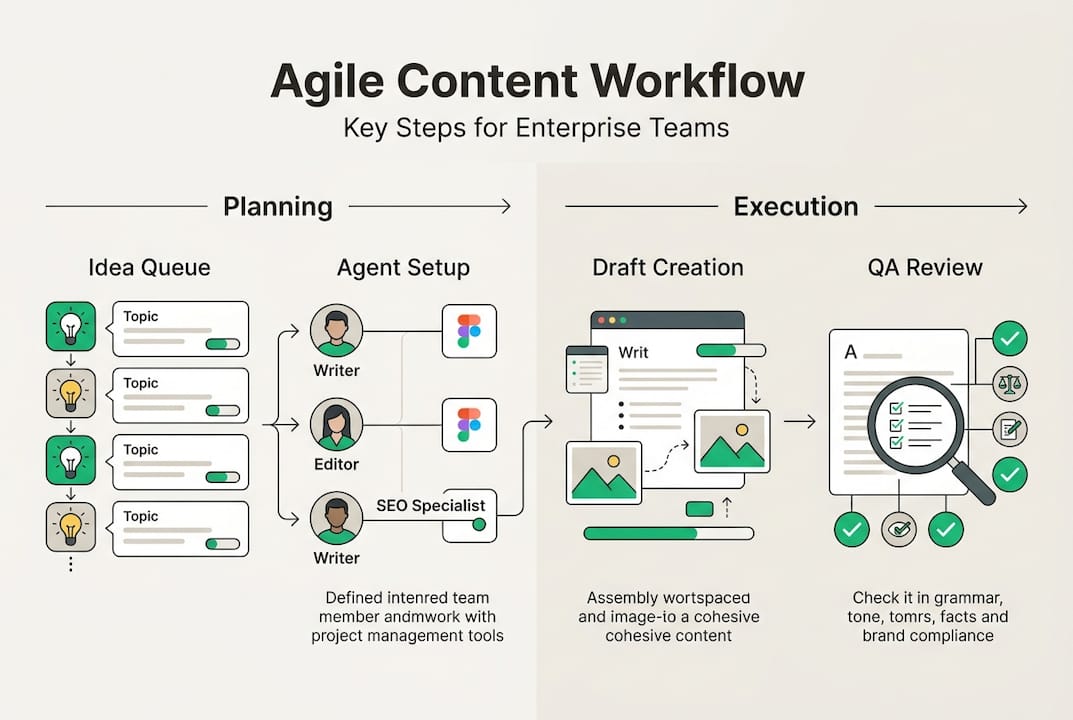
With your tools and access ready, here is how to execute the autonomous workflow from start to finish.
-
Submit content ideas. The content owner submits a topic brief, including target keyword, audience segment, desired tone, and any reference URLs. Batch submissions work best for throughput.
-
AI research and drafting. The Coordinator Agent assigns the brief to the research module, which pulls keyword data, competitor content, and relevant sources. The drafting engine then generates a structured article aligned to your brand voice and SEO parameters.
-
Image generation. The Image Agent creates or selects visuals based on the article topic and any visual guidelines you have set. Output is attached automatically to the draft.
-
QA and human review. The draft moves to the QA reviewer queue. A human editor checks for accuracy, brand alignment, and any AI output inconsistencies before approving. This step is non-negotiable at enterprise scale.
-
Scheduling and publishing automation. Once approved, the WP Agent formats the post, applies tags and categories, and schedules or publishes it according to your editorial calendar rules.
The full pipeline from idea to published can complete in 90 seconds with minimal manual intervention. At scale, this means a team of three can manage content output that previously required a full editorial department.

For teams focused on WordPress content scalability, the key is setting precise output rules for each agent. Define word count ranges, heading structures, internal link requirements, and call-to-action placements upfront. Agents follow rules consistently, so the more specific your setup, the more consistent your output.
Review enterprise publishing examples to see how large organizations have structured their agent instructions for different content types, from product pages to regional news updates.
Pro Tip: Batch your content submissions in groups of 10 to 20 topics at a time. This maximizes throughput and allows the QA reviewer to work through a consistent queue rather than reviewing isolated posts throughout the day.
Troubleshooting, quality checks, and optimizing your workflow
Even the best workflows need fine-tuning. Here is how to avoid common traps and ensure enterprise-grade quality at scale.
Common issues teams encounter include:
- Publishing errors: Often caused by permission conflicts or plugin incompatibilities. Resolve by auditing user roles and running compatibility checks after any plugin update.
- Duplicate content: Can occur when bulk submissions include overlapping topics. Use a topic tracking sheet or CMS tagging system to flag duplicates before submission.
- AI output inconsistencies: Happen when agent instructions are too vague. Tighten your output rules and add examples to agent prompts to improve consistency.
- Broken image attachments: Usually a file size or format conflict. Set image output parameters in the Image Agent configuration to prevent this.
- Scheduling conflicts: Multiple agents writing to the same publishing queue can cause overlaps. Set queue priority rules and stagger submission batches.
A structured QA checklist should include:
- Factual accuracy review
- Brand voice alignment check
- Internal link verification
- Image relevance and quality check
- SEO metadata completeness
- Staging preview before live publish
“Quality control and structured review remain vital when content output is scaled autonomously. Speed without oversight creates brand risk.”
The human-in-the-loop step is the most important safeguard in any autonomous system. AI agents produce consistent output, but they do not catch factual errors in source data or shifts in brand positioning. Reviewers should focus on those gaps, not on formatting or structure, which the agents handle reliably.
For optimization, track rejection rates in your QA queue. If more than 10 to 15 percent of drafts require significant revision, your agent instructions need refinement. Treat rejected drafts as training data. Update your prompts and output rules based on recurring issues.
Teams using WordPress AI tools can often access prompt libraries and agent configuration templates that accelerate this refinement process. Scaling improvements across multiple sites is straightforward once your core configuration is validated on a single site.
Why streamlined, autonomous workflows are a strategic shift for marketing teams
Most enterprise teams still measure content velocity in weeks. Developer sprints, approval chains, and publishing queues all add friction. Autonomous workflows reduce that friction, but the real value is organizational, not just operational.
Marketing teams that own their publishing pipeline spend more time on strategy, personalization, and audience segmentation. Less time on admin. That shift changes how teams are structured and how they measure success. Content becomes a lever for growth, not a byproduct of development cycles.
The risk that often gets overlooked is scale without oversight. Teams that automate publishing without maintaining human QA checkpoints often see brand quality erode gradually. A single misconfigured agent instruction can produce hundreds of off-brand posts before anyone notices. Balanced automation, with clear review gates, is the only sustainable model.
Future-proofing your content operation means investing in workflow design, not just tools. The right AI content strategies account for governance, role clarity, and iterative improvement from the start. Tools change. A well-designed workflow adapts.
Ready to transform your WordPress content workflow?
Autonomous content workflows give enterprise marketing teams real publishing independence. Faster output, fewer bottlenecks, and consistent quality across every site in your portfolio.
40Q builds enterprise WordPress platforms designed for exactly this kind of agility. Our AI suite for WordPress integrates multi-agent publishing workflows directly into your existing stack. No rebuilds. No developer dependency for day-to-day content. If your team is ready to reduce friction and scale content output, explore our enterprise WordPress empowerment solutions and see what a purpose-built platform can do for your marketing operation.
Frequently asked questions
How fast can autonomous workflows publish WordPress content?
Using multi-agent AI teams, you can go from idea to published content in 90 seconds per article with minimal manual steps involved.
Which plugins or tools are essential for autonomous WordPress publishing?
The WP AI Writer plugin and WordPress.com’s built-in AI agents are the primary tools for queue management, drafting, and publishing at scale.
How do you keep quality high with autonomous content workflows?
Always include a human QA review step and use a staging environment before going live. Structured review processes remain essential when automating content at volume.
Does this work for multiple sites at once?
Yes. AI workflows scale to 100+ WordPress sites simultaneously, making them well-suited for enterprise portfolios with regional or brand-specific properties.
Recommended
- How to Empower Content Teams with a Modern CMS – 40Q
- Enterprise SEO Workflows Explained: Enabling Scalable Impact – 40Q
- Digital Experience Optimization Guide for Enterprise Teams – 40Q
- Drupal to WordPress Migration | Save up to 60% on CMS Costs – 40Q
- Content Update Workflow WordPress: Efficient Step Guide – WPCTO

Feb 18, 2026
WordPress
Website Performance Optimization Guide for WordPress Teams

Aug 23, 2025
WordPress
How the Model Context Protocol (MCP) Will Transform Martech and WordPress

Mar 3, 2026
WordPress