WordPress
How to Secure WordPress for Enterprise-Grade Protection

José Debuchy
February 3, 2026 | 3 min to read
Complex WordPress environments in global organizations often present hidden threats and persistent developer bottlenecks. For CTOs and IT Directors, overlooked vulnerabilities are rarely isolated—they impact regulatory compliance, operational resilience, and long-term digital strategy. By focusing on a strategic, stepwise approach that prioritizes comprehensive security assessment and advanced threat detection, this guide empowers you to proactively safeguard your WordPress platform and streamline workflows without unnecessary risk.
Quick Summary
| Key Takeaway | Explanation |
|---|---|
| 1. Conduct a thorough security assessment | Evaluate your WordPress infrastructure to identify vulnerabilities and establish a baseline for security enhancements. |
| 2. Implement robust access controls | Change default credentials and enforce multi-factor authentication to minimize unauthorized access and secure user permissions. |
| 3. Utilize advanced threat detection systems | Integrate real-time monitoring and automated vulnerability scanning to proactively identify and respond to security threats. |
| 4. Integrate continuous compliance monitoring | Develop a strategy to ensure adherence to regulations and maintain a comprehensive view of security and compliance metrics. |
| 5. Commit to ongoing security optimization | Regularly assess vulnerabilities and update security measures to ensure resilience against evolving digital threats. |
Step 1: Assess current WordPress environment
Securing your WordPress platform begins with a comprehensive assessment of your current environment. This initial diagnostic phase involves systematically examining your existing WordPress infrastructure to identify potential vulnerabilities and establish a baseline for enterprise-grade protection.
Start by conducting a detailed security assessment and authorization that evaluates your current system configuration. Your assessment should include the following critical areas:
- Plugin inventory: List every installed plugin, including version numbers
- User access levels: Document all user roles and administrative permissions
- Current WordPress version: Verify the exact version and check for available updates
- Hosting environment: Analyze server configurations and hosting provider security features
Organizations must treat this assessment as more than a routine checklist. It represents a strategic opportunity to map potential security risks before they become critical vulnerabilities. Key components include reviewing recent security logs, identifying outdated components, and understanding your current attack surface.
Comprehensive security assessment is not about finding every minor issue, but understanding your systemic vulnerabilities and their potential enterprise-wide impact.
Pro tip: Conduct this assessment quarterly and maintain a detailed inventory of all WordPress components to stay ahead of potential security risks.
Step 2: Harden core configurations and access controls
Securing your WordPress infrastructure requires strategic hardening of core configurations and robust access control mechanisms. This critical step transforms your platform from a potential vulnerability into a resilient digital fortress that protects against unauthorized intrusions and potential security breaches.
Implement website security best practices by focusing on these fundamental protection strategies:
- Default credential elimination: Change all default usernames and passwords immediately
- Multi-factor authentication: Enable advanced authentication protocols for all admin accounts
- Role-based access control: Limit user permissions to minimum required levels
- Security header configuration: Implement strict content security policies
- Account management: Disable unused accounts and enforce regular password rotations
Enterprise WordPress environments demand granular control over system access. This means meticulously designing user roles, implementing strict password policies, and continuously monitoring administrative privileges. Each configuration decision should balance operational flexibility with security constraints.
Effective access control is not about restricting functionality, but strategically managing risk while maintaining system usability.
Complex WordPress security requires ongoing vigilance. Regular audits of user permissions, systematic review of access logs, and proactive identification of potential vulnerabilities will help maintain your platform’s defensive posture.

Pro tip: Create a comprehensive access control matrix documenting every user’s specific permissions and review it quarterly to ensure minimal privilege principles are consistently applied.
Step 3: Implement advanced threat detection and response
Protecting your WordPress platform requires implementing sophisticated threat detection and rapid response mechanisms that go beyond traditional security approaches. This critical step transforms your defensive strategy from reactive to proactive, enabling real-time identification and neutralization of potential security risks.
Begin by integrating comprehensive network security monitoring that provides granular visibility into your WordPress environment. Your advanced threat detection strategy should encompass:
- Real-time anomaly tracking: Monitor unexpected user behaviors and system activities
- Automated vulnerability scanning: Continuously check for potential security weaknesses
- Threat intelligence integration: Connect with current security databases for emerging threat alerts
- Intrusion detection systems: Implement WordPress-specific monitoring tools
- Incident response planning: Develop clear protocols for swift threat mitigation
Enterprise WordPress environments demand a multilayered approach to security. This means not just detecting threats but understanding their potential impact, creating adaptive response mechanisms, and maintaining a comprehensive threat landscape awareness. Continuous learning and quick adaptation are key to staying ahead of sophisticated cyber risks.
Advanced threat detection is not about creating impenetrable barriers, but building intelligent systems that can dynamically respond to evolving security challenges.
Successful implementation requires a holistic view of your digital ecosystem, combining technological solutions with strategic human oversight. Regular training, simulation exercises, and constant refinement of your detection algorithms will help maintain a robust security posture.
Pro tip: Configure automated threat intelligence feeds that provide real-time updates on WordPress-specific vulnerabilities and integrate them directly into your security monitoring systems.
Step 4: Integrate enterprise monitoring and compliance tools
Securing your WordPress platform demands sophisticated enterprise monitoring and comprehensive compliance integration that transcends basic security measures. This critical step transforms your security infrastructure into a proactive, intelligence-driven system capable of meeting complex regulatory requirements and maintaining robust digital governance.
The following table compares traditional security and enterprise WordPress security approaches:
| Aspect | Traditional Security | Enterprise Security |
|---|---|---|
| Focus | Basic protection | Strategic risk management |
| User management | Manual checks | Automated, role-based controls |
| Threat detection | Periodic reviews | Real-time, automated detection |
| Compliance | Minimal | Mapped to standards (GDPR, HIPAA) |
Begin by implementing strategic risk management frameworks that provide comprehensive visibility into your WordPress ecosystem. Your enterprise monitoring strategy should systematically address:
- Continuous compliance tracking: Monitor regulatory adherence in real-time
- Automated audit trail generation: Create detailed logs of all system activities
- Regulatory standard mapping: Align monitoring tools with GDPR, HIPAA, and other relevant standards
- Comprehensive reporting mechanisms: Generate detailed compliance documentation
- Security event correlation: Link monitoring insights across multiple platforms
Enterprise WordPress environments require a holistic approach that bridges technological capabilities with rigorous compliance protocols. This means developing an integrated monitoring system that not only detects potential risks but also provides actionable intelligence for rapid response and continuous improvement.
Effective enterprise monitoring transforms compliance from a checkbox exercise into a strategic organizational capability.
Successful implementation requires more than just tool deployment. It demands creating a culture of continuous security awareness, where monitoring becomes an intrinsic part of your organization’s operational DNA. Regular training, periodic system assessments, and adaptive configuration will help maintain a dynamic and resilient security posture.
Pro tip: Develop a centralized dashboard that aggregates compliance metrics from multiple sources, enabling real-time visibility and swift decision-making across your WordPress infrastructure.
Step 5: Verify and continuously optimize WordPress security
Securing your WordPress platform is an ongoing process that demands persistent attention and strategic refinement. This critical final step transforms security from a static checkpoint into a dynamic, adaptive strategy that evolves alongside emerging digital threats.
Begin by implementing systematic cybersecurity best practices that provide comprehensive security validation. Your continuous optimization strategy should encompass:
- Regular vulnerability assessments: Schedule periodic comprehensive security scans
- Automated patch management: Implement immediate updates across all WordPress components
- Performance and security correlation: Track how security measures impact system performance
- Threat model evolution: Continuously update your security approach based on emerging risks
- Comprehensive logging and analysis: Maintain detailed records of all security events
Enterprise WordPress environments require a proactive security methodology that transcends traditional defensive approaches. This means developing an adaptive system that learns from each interaction, automatically identifies potential weaknesses, and swiftly implements protective measures.
Continuous security optimization is not about achieving perfection, but maintaining a resilient and responsive digital ecosystem.
Successful implementation demands more than technological solutions. It requires cultivating a security-first organizational culture where every team member understands their role in maintaining digital resilience. Regular training, scenario-based simulations, and transparent communication will help embed security consciousness throughout your organization.
Pro tip: Create a dedicated security dashboard that provides real-time insights into your WordPress environment, enabling instant visibility and rapid response to potential threats.
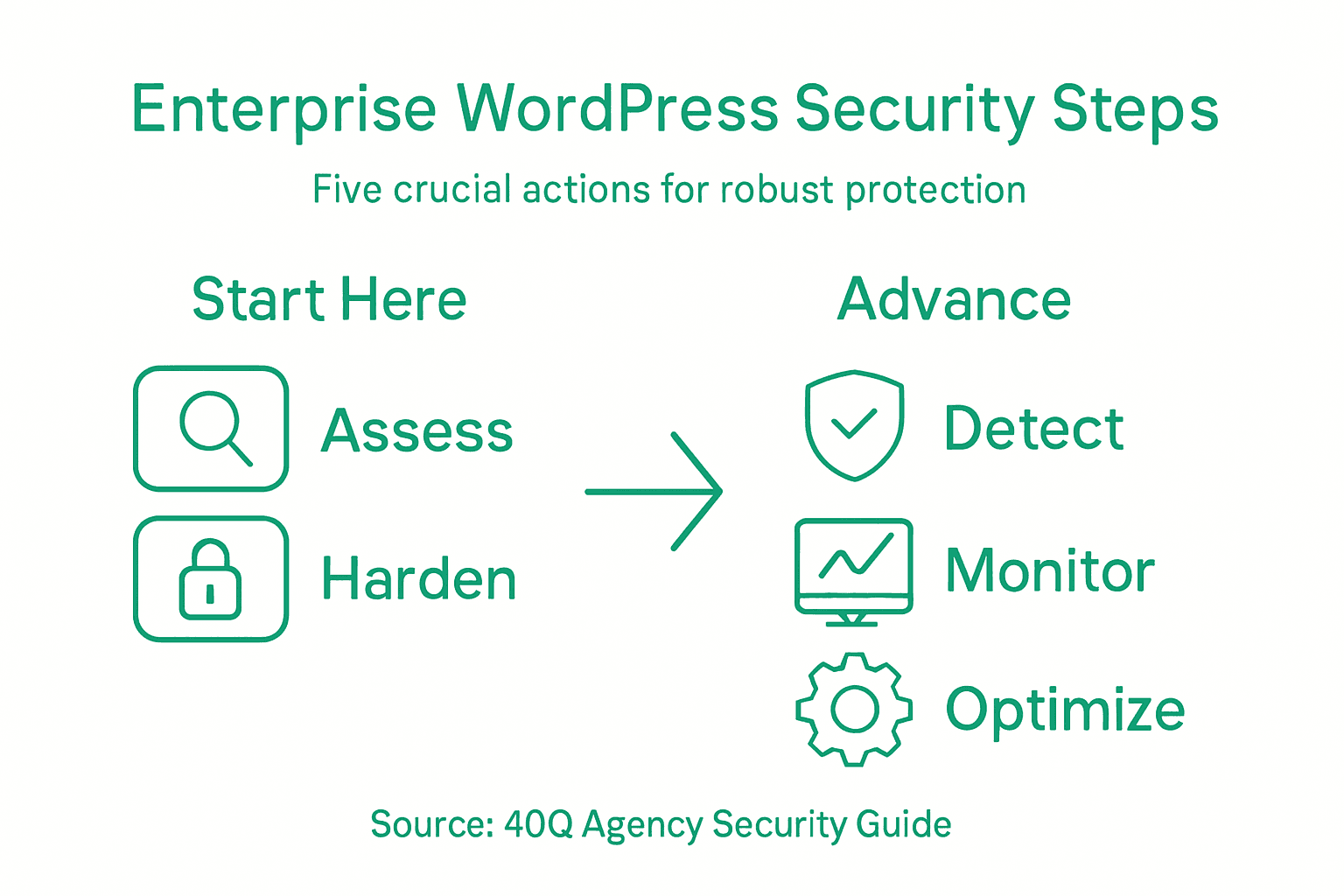
Here’s a summary of the five key WordPress security steps and their primary objectives:
| Step | Goal | Main Outcome |
|---|---|---|
| Assess environment | Identify vulnerabilities | Establish security baseline |
| Harden configurations | Lower risk of misuse | Enhance access protection |
| Advanced detection | Spot threats early | Enable proactive defense |
| Enterprise monitoring | Achieve compliance | Improve audit readiness |
| Continuous optimization | Maintain resilience | Adapt to new threats |
Strengthen Your Enterprise WordPress Security with 40Q
Securing an enterprise WordPress platform requires more than just routine checks. The challenges of assessing environments, hardening configurations, implementing advanced threat detection, and maintaining continuous optimization can overwhelm teams focused on marketing agility and operational control. At 40Q, we understand these complexities and have crafted solutions designed to give your marketing teams full autonomy while IT maintains stringent control over security, compliance, and scalability.
Experience benefits like
- Efficient launch of campaigns with our proprietary FAS Block System™
- Enterprise-grade security aligned with evolving threats
- Reduced developer dependency for daily publishing
Are you ready to elevate your WordPress security to enterprise-grade protection without sacrificing speed or control? Discover how 40Q’s trusted platform can help you stay ahead of threats and compliance demands. Visit https://40q.agency to learn more and start transforming your WordPress environment today.
Explore our enterprise solutions at 40Q Agency and secure your WordPress with confidence.
Frequently Asked Questions
How can I assess my current WordPress environment for security vulnerabilities?
Start by conducting a thorough security assessment of your WordPress infrastructure. Create a detailed inventory of installed plugins, verify user access levels, and check for the latest updates for your WordPress version within 30 days.
What core configurations should I harden for better WordPress security?
To harden your WordPress security, eliminate default usernames and passwords, enable multi-factor authentication, and apply role-based access control. Implement these changes immediately to reduce potential entry points for unauthorized access.
How do I implement advanced threat detection for my WordPress site?
Integrate real-time anomaly tracking and automated vulnerability scanning into your WordPress security strategy. Begin by setting up these systems within the next month to enhance your ability to identify and respond to potential security threats swiftly.
What should my enterprise monitoring strategy include to maintain compliance?
Your enterprise monitoring strategy should encompass continuous compliance tracking, automated audit trail generation, and comprehensive reporting mechanisms. Aim to align with relevant regulations and standards within 60 days for improved security oversight.
How can I continuously optimize security for my WordPress environment?
Establish a routine for regular vulnerability assessments and automated patch management to keep your WordPress environment secure. Schedule these assessments quarterly to adapt your strategy to new threats effectively.
Recommended

Nov 14, 2024
WordPress
Mastering Multilingual WordPress CMS

Feb 2, 2026
WordPress
Role of Security in Website Development: Impact on Enterprise WordPress Platforms

Nov 4, 2025
WordPress