
WordPress
WordPress governance best practices for enterprise teams

José Debuchy
March 28, 2026 | 3 min to read
Enterprise WordPress deployments scale fast. The problems scale faster. Without deliberate governance, large teams accumulate conflicting permissions, unreviewed content, and security gaps that compound quietly until they become critical. Governance prevents editorial chaos by codifying processes directly into WordPress, enabling scale without bureaucracy and acting as a safety net for creative teams rather than a constraint on them. This guide covers field-tested methods, practical frameworks, and real-world examples to help CMOs and marketing operations leaders build governance that actually works.
Key Takeaways
| Point | Details |
|---|---|
| Prioritize granular roles | Go beyond default WordPress roles to enforce least-privilege access and match your enterprise structure. |
| Codify editorial workflows | Implement multi-stage review processes to maximize compliance and prevent unauthorized publishing. |
| Audit and automate for scale | Use comprehensive audit logging and automate content lifecycle tasks for secure, efficient management. |
| Limit plugin and theme risks | Govern plugin installation, updates, and ownership to minimize vulnerabilities and platform drift. |
| Implement incrementally | Start small, measure success, get buy-in, and provide ongoing training for governance policies to stick. |
Why WordPress governance matters for enterprises
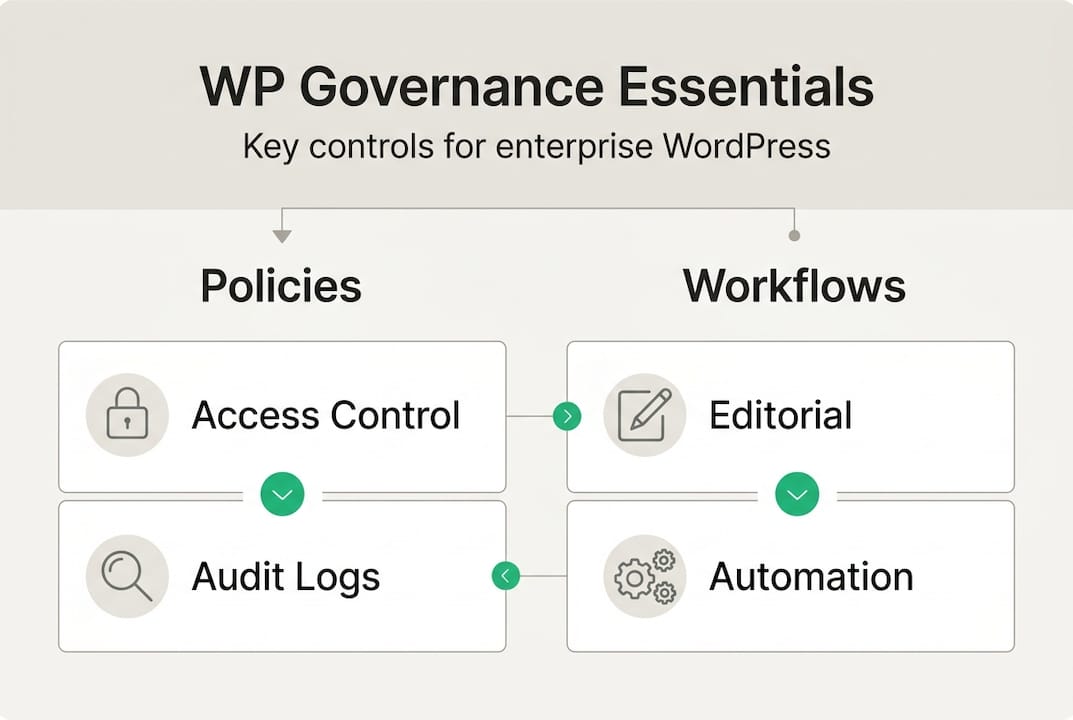
Governance in WordPress means more than access controls. It covers policies, role definitions, editorial workflows, compliance checkpoints, and the systems that enforce all of them consistently across large teams. Without it, enterprises face editorial sprawl, duplicated effort, and regulatory exposure.
The scale of enterprise WordPress adoption makes this urgent. 28% of enterprise WordPress sites handle over 10 million monthly visits. 82% of enterprise users report good or excellent ROI. And 95% plan continued use, with 66% actively contributing to open source. These numbers reflect deep organizational commitment, which means governance failures carry proportionally higher stakes.
For teams exploring enterprise-scale WordPress benefits, the value is clear. But realizing that value requires structure.
“Governance is not bureaucracy. It is the infrastructure that lets creative teams move fast without breaking things.”
Key governance pillars for enterprise WordPress:
- Role and permission management across departments and geographies
- Editorial workflow enforcement with multi-stage review
- Audit logging for accountability and compliance
- Plugin and theme controls to prevent security sprawl
- Content lifecycle automation for time-sensitive material
Custom user roles and permissions: A foundation for control
Default WordPress roles, Administrator, Editor, Author, Contributor, and Subscriber, were designed for small publishing teams. They do not map to enterprise hierarchies. A global media company or regulated financial institution needs far more granularity.
Granular user roles and capabilities beyond WordPress defaults enforce least privilege and support complex organizational structures. In regulated industries like fintech, default roles are simply insufficient for compliance workflows.
A practical enterprise role structure might look like this:
- Junior Writer drafts content, no publish access
- Senior Editor reviews and edits, can approve for next stage
- Legal/Compliance Reviewer flags or clears content for regulated topics
- SEO Specialist optimizes metadata and structure before final approval
- Publisher holds the only publish capability
| Feature | Default WordPress roles | Custom enterprise roles |
|---|---|---|
| Publish control | Any Editor or Admin | Restricted to Publisher role only |
| Compliance review | Not supported | Dedicated Legal Reviewer role |
| Department segmentation | None | Role per team or region |
| Least privilege enforcement | Minimal | Fully configurable |
| Audit trail per role | Limited | Comprehensive |
For teams building compliance-ready role setups, this level of specificity is non-negotiable. Explore custom user management strategies to see how this maps to real deployments. The goal is empowered marketing teams that move fast within defined guardrails.
Pro Tip: Document every custom role in a shared governance register. Audit privileges quarterly and remove access that no longer matches a user’s current responsibilities.
Editorial workflows: From chaos to compliance
Role structure defines who can act. Workflow governance defines what happens before they do. Multi-stage editorial pipelines prevent unauthorized publishing, reduce last-minute legal scrambles, and create a clear record of every content decision.
Multi-stage pipelines using plugins like PublishPress or Oasis Workflow prevent unauthorized publishing and give teams visibility into where content sits at any moment. These tools integrate directly with WordPress and support custom statuses like “Pending Legal Review” or “Awaiting SEO Approval.”
A well-designed editorial workflow for enterprise teams:
- Draft created by writer, saved as private
- Editorial review by Senior Editor for accuracy and tone
- SEO review for keyword alignment and metadata
- Legal/Compliance review for regulated claims or disclosures
- Final approval by Publisher before scheduling
For teams with editorial review requirements tied to brand standards or regulatory mandates, this structure eliminates the bottlenecks that come from ad hoc processes.
“A workflow is only as strong as its enforcement mechanism. Plugins that hard-block publishing without approval are more reliable than policies that rely on memory.”
Pro Tip: Pilot your new workflow with one content team before rolling it out organization-wide. Collect feedback after the first 30 days and adjust stage definitions before scaling.
Audit logging and real-time monitoring: Accountability at scale
Every change in a WordPress environment tells a story. Who logged in. What they edited. Which plugin was deactivated. Which admin role was granted at 11 PM on a Friday. Without audit logging, that story is invisible.

Comprehensive audit logging with real-time alerts for critical changes like admin creations or plugin deactivations is a core governance requirement. Tools like WP Activity Log capture granular event data and can trigger notifications when high-risk actions occur.
What to log in an enterprise WordPress environment:
- User logins, failed attempts, and session durations
- Content creation, edits, deletions, and status changes
- Admin role grants and permission modifications
- Plugin and theme installations, updates, and deactivations
- Settings changes across core, plugins, and themes
Real-time alerts matter most for activity tracking techniques tied to compliance. An alert when a new admin account is created outside business hours is not paranoia. It is standard practice.
“Transparent logs are not just a security tool. They are the audit trail that satisfies regulators, resolves internal disputes, and proves due diligence when something goes wrong.”
Plugin and theme governance: Balancing agility and security
Plugin sprawl is one of the most common and underestimated risks in enterprise WordPress. Teams install plugins to solve immediate problems, then forget them. Abandoned plugins with unpatched vulnerabilities become attack vectors.
Plugin and theme governance requires reviewing before installation, assigning owners, automating updates, and whitelisting for multisite environments to avoid sprawl and security risks.
Before approving any plugin, ask:
- When was it last updated by the developer?
- How many active installations does it have?
- Does it have a documented security track record?
- Is there an assigned internal owner who will maintain it?
- Does it duplicate functionality already covered by an existing plugin?
For multisite networks, a whitelist policy ensures only pre-approved plugins can be activated across subsites. This prevents individual site admins from introducing unapproved code into a shared environment.
Explore theme setup best practices and plugin control frameworks for structured approaches to managing this at scale.
Pro Tip: Maintain a single documented changelog for all plugin and theme events. Include the date, the change, the reason, and the owner. This log becomes invaluable during security audits or incident response.
Content lifecycle automation: Managing content at scale
Not all content is evergreen. Event pages, promotional offers, seasonal campaigns, and time-sensitive legal disclosures all have expiration dates. Without automation, outdated content stays live, creating compliance risk and brand inconsistency.
Automating content lifecycle means archiving time-bound content post-event and locking Gutenberg blocks to prevent layout breaks. This keeps the site accurate without requiring manual intervention from editors or developers.
Automation plugins and must-have features:
- PublishPress Future: Schedule automatic unpublishing or status changes
- Block Locking (native Gutenberg): Prevent editors from modifying approved layout blocks
- WP Scheduled Posts: Manage content queues with precision timing
- Custom post expiry rules: Trigger archiving based on category, tag, or custom field
For teams managing CMS content lifecycle automation, these tools reduce the manual overhead that slows publishing operations. Review enterprise CMS features and marketing automation integrations to see how automation connects across the stack.
Pro Tip: Schedule quarterly audits of archived and locked content. Policies change, campaigns get revived, and locked blocks sometimes need updates. A quarterly review prevents governance from becoming a barrier to legitimate content needs.
Implementing governance: Practical steps for enterprise success
Governance does not get implemented in a single sprint. It requires phased rollout, executive support, and continuous reinforcement. The organizations that succeed treat it as an ongoing operational discipline, not a one-time project.
Incremental implementation means documenting the current state, piloting policies with one team, securing executive buy-in, and training continuously for adoption.
A practical rollout sequence:
- Assess: Audit current roles, plugins, workflows, and content inventory
- Document: Define policies, role maps, and workflow stages in writing
- Pilot: Deploy governance changes with one team or content vertical
- Train: Run structured onboarding for all affected staff
- Iterate: Collect feedback, measure adoption, and refine policies quarterly
Minimum viable governance for any enterprise WordPress environment includes clear ownership of each site section, a staging environment for all changes, and a formal change review process before anything reaches production.
“Without governance, drift leads to failures. Small inconsistencies accumulate until a security incident, a compliance audit, or a public content error forces a reactive overhaul.”
Refresher training every six months keeps governance practices current as teams grow and platforms evolve. The Ford Foundation, for example, reduced internal training time significantly after formalizing its WordPress governance model, freeing editorial staff to focus on content rather than process navigation.
Partnering for enterprise WordPress governance success
Building governance at enterprise scale requires more than documentation and plugins. It requires a platform architecture designed for control, speed, and compliance from the ground up.
40Q works with medium and large organizations to design and implement enterprise-grade WordPress empowerment frameworks that give marketing teams publishing autonomy while IT retains full governance control. Our FAS Block System™ locks layout integrity, enforces brand standards, and eliminates developer dependency for day-to-day publishing. We also integrate AI tools for governance and advanced search for governance to support content discoverability and workflow intelligence at scale. If your organization is ready to move from reactive content management to proactive governance, we can help you build the right foundation.
Frequently asked questions
Recommended
Jan 19, 2026
WordPress
7 Scalable Web Architecture Examples for Enterprise Sites

Mar 24, 2026
WordPress
Master the future of enterprise CMS: 73% faster delivery

Aug 12, 2024
WordPress