
WordPress
Enterprise CMS explained: scalable solutions for 2026

José Debuchy
March 19, 2026 | 3 min to read
Many organizations assume any content management system can handle enterprise needs, but traditional CMS platforms collapse under high traffic and complex workflows. Enterprise CMS is purpose-built for scale, supporting thousands of concurrent editors, millions of content items, and global compliance requirements that traditional systems cannot match. This guide reveals what defines true enterprise CMS, backed by performance data and strategic insights to help marketing and IT leaders choose the right architecture. You’ll learn how to avoid costly migration pitfalls, reduce developer dependency, and implement systems that empower teams while maintaining governance and security.
Key takeaways
| Point | Details |
|---|---|
| Enterprise CMS handles massive scale | Supports millions of content items and thousands of concurrent users versus traditional systems designed for smaller workloads. |
| Performance gains are measurable | Organizations achieve 50% faster time-to-market and 31% improved page speeds with modern enterprise platforms. |
| Architecture choice impacts success | Selecting monolithic, headless, or hybrid depends on your team capabilities, omnichannel needs, and governance requirements. |
| Migration risks are preventable | 53% of CMS migrations exceed budgets due to poor planning, but phased approaches reduce failure rates. |
| Marketing autonomy drives ROI | Systems that eliminate developer bottlenecks for routine publishing deliver faster campaign deployment and lower operational costs. |
What is enterprise CMS and how does it differ from traditional CMS?
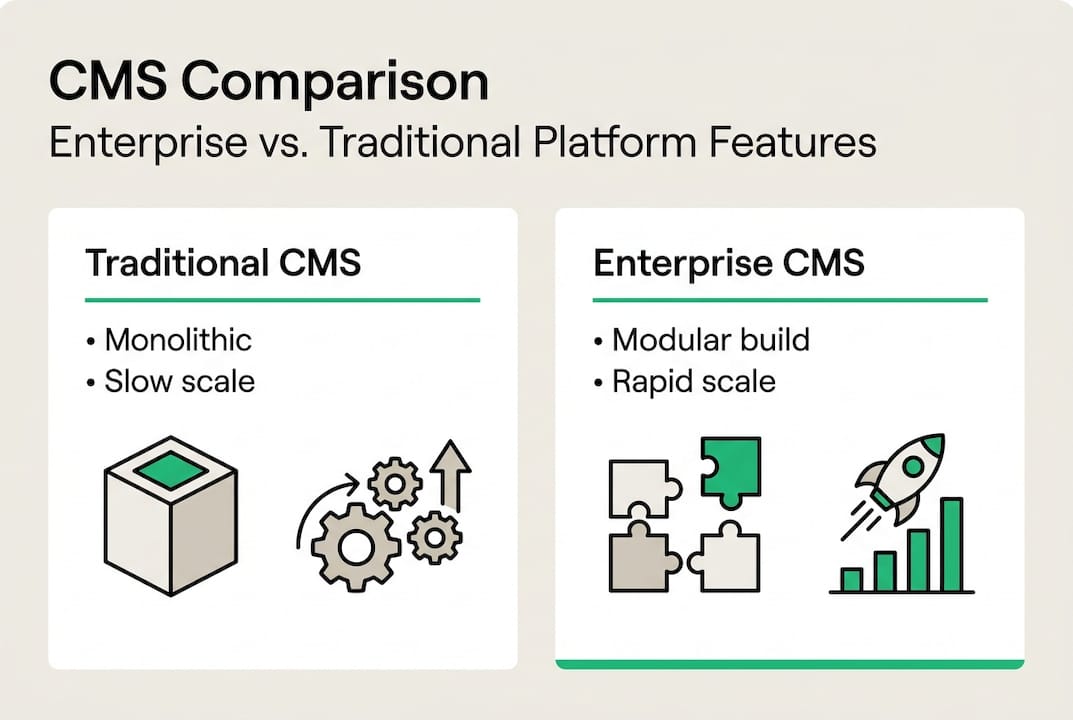
Enterprise CMS platforms are engineered for organizations managing vast content libraries, supporting millions of content items and thousands of concurrent editors across global teams. Traditional CMS solutions work well for smaller sites but lack the infrastructure to handle high-traffic events, complex approval workflows, or enterprise-grade integrations with marketing automation, analytics, and customer data platforms. The difference isn’t just size; it’s architectural sophistication.

Traditional systems store content in monolithic databases tied to presentation layers, creating bottlenecks when traffic spikes or when multiple teams need simultaneous access. Enterprise CMS separates content management from delivery, enabling distributed teams to work without conflicts while IT maintains performance and security controls. This separation supports omnichannel publishing, where the same content powers websites, mobile apps, digital signage, and voice interfaces without duplication.
Governance capabilities distinguish enterprise-ready CMS features from basic platforms. Enterprise systems enforce role-based permissions, audit trails, compliance workflows, and version control at scale. Marketing teams gain autonomy to publish within guardrails IT establishes, eliminating the developer dependency that slows campaign launches. Traditional CMS platforms require custom coding for advanced workflows, creating technical debt and operational friction.
| Capability | Traditional CMS | Enterprise CMS | | — | — | | Content volume | Thousands of pages | Millions of items | | Concurrent users | Dozens of editors | Thousands globally | | Workflow complexity | Simple approval chains | Multi-stage governance | | Integration depth | Basic plugins | Enterprise APIs and middleware | | Traffic handling | Moderate loads | High-traffic events and spikes |
The practical impact for marketing and IT teams centers on velocity and control. Marketing moves faster when publishing doesn’t require developer intervention for routine tasks. IT maintains security, performance, and compliance through centralized policies rather than reviewing every content change. Understanding headless vs traditional CMS differences helps you evaluate whether your current system truly meets enterprise demands or merely scales a traditional architecture.
Performance benchmarks and operational advantages of enterprise CMS
Real-world data reveals measurable gains when organizations migrate to enterprise CMS platforms. Companies implementing modern systems report 50% reduced time-to-market and doubled deployment frequency, enabling marketing teams to launch campaigns and landing pages in days rather than weeks. Page load speeds improve by an average of 31%, directly impacting user experience, search rankings, and conversion rates. These aren’t marginal improvements; they represent fundamental shifts in operational capability.
Reliability metrics demonstrate enterprise CMS maturity. Leading platforms guarantee 99.99% uptime through distributed architectures and automated failover systems. API response times consistently measure under 100 milliseconds, ensuring content delivery remains fast even during traffic surges. Traditional CMS platforms struggle to maintain performance during product launches, seasonal campaigns, or viral content events, often requiring emergency scaling that disrupts workflows and increases costs.
Total cost of ownership analysis favors modern enterprise CMS over legacy monolithic systems like Adobe Experience Manager. While initial migration investments appear substantial, organizations recoup costs through reduced developer hours, faster campaign execution, and lower infrastructure expenses. Cloud-native enterprise CMS platforms eliminate server maintenance overhead and scale automatically, converting fixed IT costs into variable expenses aligned with business growth.
| Metric | Traditional CMS | Enterprise CMS |
|---|---|---|
| Time to market | 4-6 weeks | 1-2 weeks |
| Page load speed | 3.2 seconds | 2.2 seconds |
| Uptime SLA | 99.5% | 99.99% |
| API latency | 200-500ms | Under 100ms |
| Developer hours per campaign | 40-60 hours | 10-15 hours |
Pro Tip: Prioritize CMS solutions offering both speed and governance to avoid costly rework when compliance requirements emerge or traffic patterns change unexpectedly.
The operational advantage extends beyond speed. Marketing autonomy with enterprise CMS means teams launch A/B tests, personalize content, and adapt messaging without technical tickets. IT teams shift focus from routine publishing support to strategic initiatives like API integrations, security hardening, and performance optimization. This division of labor maximizes both team’s impact while reducing friction and delays that plague traditional CMS environments.
Common pitfalls and strategic considerations in enterprise CMS adoption
High-traffic organizations face unique challenges that expose CMS weaknesses. Global compliance requirements like GDPR, CCPA, and industry-specific regulations demand audit trails, data residency controls, and consent management that traditional systems handle poorly. Black Friday events, product launches, and viral campaigns create traffic spikes that crash under-provisioned infrastructure, damaging brand reputation and revenue. Enterprise CMS must anticipate these scenarios through architecture, not emergency patches.
Migration failures stem from predictable mistakes. Poor front-end integration planning creates performance bottlenecks when headless CMS deployments lack optimized delivery layers. Organizations underestimate governance needs, launching systems without defined workflows, approval chains, or content standards. SEO degradation occurs when URL structures change without proper redirects or when metadata management gets overlooked during content migration. These issues compound when teams rush implementation to meet arbitrary deadlines.
53% of CMS migrations exceed budgets due to poor content modeling, governance gaps, and frontend performance neglect.
Budget overruns trace to insufficient planning and unrealistic timelines. Teams underestimate content audit requirements, discovering inconsistent metadata, broken links, and outdated assets mid-migration. Training budgets get cut, leaving marketing and IT teams struggling with unfamiliar interfaces and workflows. Integration complexity multiplies when legacy systems lack APIs or documentation, requiring custom middleware that wasn’t budgeted. Phased rollouts reduce risk but require executive patience that many organizations lack.
Pro Tip: Treat CMS migration as strategic transformation with phased rollout, comprehensive content audits, and role-based training rather than a technical upgrade project.
Top pitfalls and avoidance strategies include:
- Inadequate content modeling leads to rigid structures; invest time mapping content types, relationships, and metadata schemas before migration
- Missing governance frameworks create chaos; establish approval workflows, publishing calendars, and role permissions during planning phases
- Front-end performance neglect undermines user experience; architect delivery layers with CDN integration, image optimization, and caching strategies
- Insufficient training causes adoption failure; provide role-specific education for marketers, editors, and IT administrators with ongoing support
- Underestimated integration complexity derails timelines; audit all third-party systems, APIs, and data flows early to identify technical gaps
Understanding enterprise CMS pain points solutions helps you anticipate challenges and allocate resources appropriately. Organizations that succeed treat CMS adoption as organizational change requiring stakeholder alignment, not just a technology swap.
Choosing the right CMS architecture: monolithic, headless, or hybrid
Architecture decisions shape your CMS capabilities for years. Monolithic systems combine content management, storage, and presentation in unified platforms, offering simplicity for teams with limited technical resources. Everything lives in one environment, reducing integration complexity but limiting flexibility. Traditional WordPress, Drupal, and Sitecore deployments follow this model, serving content through built-in theming systems that constrain omnichannel delivery.
Headless CMS decouples content management from presentation, storing content in APIs that any front-end framework can consume. This architecture supports omnichannel publishing across websites, mobile apps, and IoT devices using the same content repository. Developers gain freedom to use modern JavaScript frameworks like React or Vue, optimizing performance and user experience. However, marketers lose visual editing capabilities and require developer support for layout changes, potentially recreating the dependency issues enterprise CMS should eliminate.
Hybrid CMS platforms bridge these approaches, offering API-first content delivery while maintaining visual editing interfaces for marketers. Modern hybrid systems provide both headless flexibility and traditional WYSIWYG editing, letting organizations choose the right tool for each use case. Marketing teams build landing pages visually while developers consume the same content through APIs for mobile apps or custom experiences.
| Architecture | Complexity | Scalability | Marketer Experience | Developer Experience | Omnichannel Support |
|---|---|---|---|---|---|
| Monolithic | Low | Moderate | Excellent | Limited | Poor |
| Headless | High | Excellent | Poor | Excellent | Excellent |
| Hybrid | Moderate | Excellent | Good | Excellent | Excellent |
Selecting the right architecture requires honest assessment of your organization’s capabilities and goals:
- Evaluate your team composition and technical skills to determine if you have developers who can build and maintain custom front-ends for headless systems
- Define your content distribution needs, identifying all channels where content must appear and whether they require real-time updates or scheduled publishing
- Assess your governance requirements, including compliance mandates, approval workflows, and audit trail needs that constrain architecture choices
- Consider your timeline and budget, recognizing that headless implementations require more upfront development than monolithic or hybrid approaches
- Plan for future growth, anticipating new channels, markets, or business models that will stress your CMS architecture
Content OS platforms represent the evolution of hybrid architecture, combining real-time operational capabilities with AI-powered governance. These systems let marketing teams work autonomously while IT maintains control through automated compliance checks, performance monitoring, and security policies. Understanding the role of CMS in digital strategy helps you evaluate which architecture aligns with broader business objectives rather than optimizing for current technical constraints.
Implementing enterprise CMS successfully: best practices and next steps
Successful implementation begins with comprehensive content audits. Catalog every content type, template, workflow, and integration in your current system before designing the new architecture. This discovery phase reveals dependencies, identifies obsolete content to archive, and exposes governance gaps to address. Organizations that skip audits encounter surprises mid-migration when undocumented integrations break or when content volume exceeds estimates.
Phased migration reduces risk compared to big-bang cutovers. Start with a pilot project covering a single site section or content type, validating your architecture and training approach before full rollout. This iteration lets you refine workflows, adjust governance policies, and optimize performance based on real usage patterns. Marketing and IT teams gain confidence through small wins rather than gambling on untested enterprise-wide changes.
Role-based training ensures adoption across skill levels. Marketers need education on visual editors, approval workflows, and SEO tools within the new CMS. IT teams require technical training on APIs, security configurations, and performance monitoring. Developers must understand content modeling, integration patterns, and deployment processes. Generic training fails because each role interacts with the CMS differently; targeted education accelerates competency and reduces support burden.
Practical implementation steps include:
- Conduct thorough content and system audits to map current state, identify migration scope, and uncover hidden dependencies
- Develop detailed content models defining types, fields, relationships, and metadata schemas that support your business requirements
- Build a pilot environment testing workflows, integrations, and performance under realistic conditions before committing to full migration
- Establish governance policies covering approval chains, publishing schedules, compliance checks, and role permissions aligned with organizational structure
- Provide role-specific training with hands-on exercises, documentation, and ongoing support channels for questions and troubleshooting
- Monitor performance metrics continuously, tracking page speed, uptime, user satisfaction, and operational efficiency to identify optimization opportunities
Pro Tip: Monitor performance metrics continuously post-launch to fine-tune workflows, validate uptime guarantees, and identify bottlenecks before they impact user experience or marketing velocity.
Governance frameworks balance control with agility. Define clear ownership for content types, establish approval requirements based on risk and visibility, and automate compliance checks where possible. Too much governance creates bottlenecks that negate enterprise CMS benefits; too little leads to quality issues and compliance violations. The right balance empowers marketing teams within guardrails IT establishes, documented in runbooks and enforced through system configurations rather than manual oversight.
Scaling confidently with enterprise CMS requires ongoing optimization. Performance tuning, security patches, and feature adoption don’t end at launch. Establish regular review cycles assessing how teams use the system, where friction occurs, and what capabilities remain underutilized. This continuous improvement approach ensures your enterprise CMS evolves with your organization rather than becoming another legacy system requiring replacement.
Explore 40Q’s enterprise CMS expertise
Navigating enterprise CMS complexity requires expertise in both technology and organizational change. 40Q specializes in enterprise-grade WordPress empowerment, implementing platforms that eliminate developer dependency for routine publishing while maintaining the security, performance, and governance IT demands. Our proprietary FAS Block System gives marketing teams visual editing capabilities for landing pages, campaigns, and localized content without sacrificing enterprise controls.
Our theme setup services establish the foundation for marketing autonomy, configuring WordPress environments that balance flexibility with consistency. We integrate AI-powered content tools that accelerate production while maintaining brand standards and compliance requirements. Partner with 40Q to future-proof your CMS investment, achieving the scalability and efficiency outlined throughout this guide while avoiding the pitfalls that derail enterprise implementations.
Frequently asked questions
Recommended

Feb 6, 2026
WordPress
Enterprise Website Best Practices for Rapid Growth

Feb 24, 2026
WordPress
Role of CMS in Digital Strategy: Powering Marketing Autonomy

Feb 10, 2026
WordPress