
WordPress
Master the future of enterprise CMS: 73% faster delivery

José Debuchy
March 24, 2026 | 3 min to read
Medium and large organizations face mounting pressure to deliver content faster while maintaining security and compliance. Yet many marketing leaders struggle with legacy CMS platforms that require developer intervention for simple tasks, creating bottlenecks that slow campaigns and frustrate teams. Meanwhile, IT decision-makers grapple with outdated systems that pose security risks and fail to scale with growing content demands. The future of enterprise CMS lies in platforms that empower marketing autonomy, integrate AI-driven workflows, and provide enterprise-grade security without sacrificing speed or flexibility.
Key Takeaways
| Point | Details |
|---|---|
| Open headless approach | Open and headless architectures separate content management from presentation to enable omnichannel delivery. |
| AI driven workflows | AI capabilities transform how enterprises create, optimize, and deliver content. |
| Marketing autonomy | The future CMS enables marketing teams to publish and manage content with fewer developer bottlenecks. |
| Security and scalability | Enterprise grade security and scalable infrastructure are essential to support growth without sacrificing performance. |
Why traditional CMS fall short for today’s enterprises
Traditional CMS platforms were built for a different era of content management. These monolithic systems couple the content repository tightly with presentation layers, creating rigid workflows that conflict with modern enterprise needs. Marketing teams wait days or weeks for developers to implement simple page changes, missing market opportunities and slowing campaign execution.
The collaboration gap between marketing and IT widens as legacy CMS often hinder marketing autonomy and slow down content delivery. Marketing leaders want creative control and speed, while IT teams need to maintain security, performance, and governance. Traditional platforms force an either-or choice, leaving both teams frustrated.
Security vulnerabilities in older CMS present serious risks. Many legacy systems lack modern authentication protocols, granular permission controls, or automated security patching. As cyber threats evolve, these gaps expose enterprises to data breaches, compliance violations, and reputational damage. Organizations handling sensitive customer data or operating in regulated industries face particularly acute challenges.
Scaling content operations becomes exponentially difficult with traditional CMS. Adding new sites, languages, or content types requires extensive custom development. Personalization capabilities remain limited or require expensive third-party integrations. Performance degrades as content volumes grow, forcing costly infrastructure upgrades that only delay the inevitable migration to more capable platforms.
Pro Tip: Audit your current CMS against enterprise requirements quarterly. Track metrics like time to publish new page types, developer hours spent on routine content requests, and security incident frequency to identify when your platform becomes a liability rather than an asset.
Key limitations that signal CMS inadequacy include:
- Developer dependency for basic content structure changes
- Inability to deliver consistent content across web, mobile, and emerging channels
- Limited or nonexistent AI capabilities for personalization and automation
- Security features that fail current compliance standards
- Poor performance under high traffic or large content repositories
- Restricted integration options with marketing automation and analytics tools
Key features shaping the future of enterprise CMS
The next generation of enterprise CMS prioritizes openness, flexibility, and intelligence. Open and headless CMS provide the foundation for modern content operations by separating content management from presentation. This architectural shift enables marketing teams to create content once and distribute it seamlessly across websites, mobile apps, digital displays, voice interfaces, and future channels not yet imagined.

Openness extends beyond architecture to integration capabilities. Modern enterprise CMS expose robust APIs that connect effortlessly with existing technology stacks. Marketing automation platforms, customer data platforms, analytics tools, and e-commerce systems all communicate bidirectionally with the CMS. This eliminates data silos and creates unified customer experiences informed by real-time insights from across the organization.
| Feature Category | Traditional CMS | Future Enterprise CMS |
|---|---|---|
| Architecture | Monolithic, coupled front and back end | Headless, API-first, decoupled |
| Content Delivery | Single channel (web) | Omnichannel (web, mobile, IoT, voice) |
| AI Capabilities | Limited or none | Integrated personalization, automation, search |
| Security | Basic authentication, manual updates | Advanced authentication, automated patching, compliance tools |
| Scalability | Vertical scaling, performance limits | Horizontal scaling, cloud-native infrastructure |
| Marketing Autonomy | High developer dependency | Self-service content creation and publishing |
AI capabilities transform how enterprises create, optimize, and deliver content. Machine learning algorithms analyze user behavior to automatically personalize content recommendations, improving engagement and conversion rates. Natural language processing powers advanced search functionality that understands user intent rather than just matching keywords. Automated content tagging and categorization reduce manual effort while improving discoverability.
Security enhancements address modern threat landscapes comprehensively. Multi-factor authentication, role-based access controls, and audit logging protect sensitive content throughout its lifecycle. Automated vulnerability scanning and patch management keep systems secure without manual intervention. Compliance frameworks for GDPR, CCPA, HIPAA, and industry-specific regulations are built into the platform rather than bolted on afterward.
Scalability operates at multiple levels in future enterprise CMS. Cloud-native architectures automatically allocate resources based on traffic patterns, handling seasonal spikes without manual intervention or overprovisioning. Content delivery networks distribute assets globally for consistent performance regardless of user location. Database optimization and caching strategies ensure fast response times even with millions of content items.
Pro Tip: Prioritize CMS platforms with proven AI capabilities rather than vague promises. Request demonstrations showing actual personalization engines, automated workflows, and intelligent search in action with enterprise-scale content volumes.
Essential capabilities to evaluate include:
- RESTful and GraphQL APIs for flexible integrations
- Built-in CDN and edge caching for global performance
- AI-powered content recommendations and search
- Granular permission systems supporting complex organizational structures
- Automated backup, disaster recovery, and failover mechanisms
- Visual page builders enabling marketing self-service
Comparing CMS architectures: traditional, headless, and hybrid
Understanding architectural differences helps enterprises choose the right CMS approach for their specific needs. Traditional CMS combine content management and presentation in a single system. Content creators work within templates that directly control how pages appear. This tight coupling simplifies initial setup and works well for small teams managing single websites with straightforward requirements.
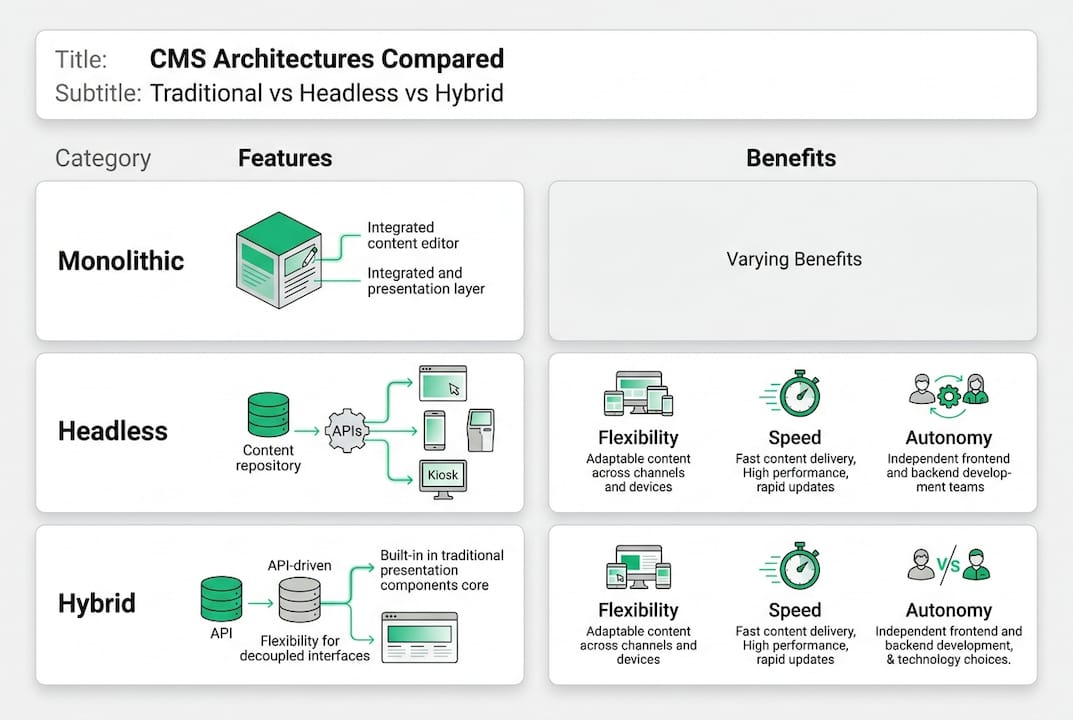
Headless CMS completely separate content management from presentation. The CMS stores and manages content through APIs, while separate front-end applications consume that content and handle display. This architecture provides maximum flexibility for omnichannel strategies where content flows to websites, mobile apps, digital kiosks, and other touchpoints. Development teams can choose optimal technologies for each channel without CMS constraints.
Hybrid CMS blend traditional and headless approaches, offering flexibility without abandoning familiar editing experiences. Marketing teams use visual page builders and preview capabilities while developers access content through APIs for custom applications. Enterprise-grade CMS autonomy improves significantly with hybrid models that balance marketing empowerment and technical flexibility.
| Architecture Type | Best For | Marketing Autonomy | Developer Flexibility | Learning Curve |
|---|---|---|---|---|
| Traditional | Single website, small teams | Low (template-dependent) | Low (platform-locked) | Low |
| Headless | Omnichannel, custom experiences | Medium (requires dev support) | High (technology agnostic) | High |
| Hybrid | Enterprise multi-channel needs | High (visual tools + APIs) | High (API access available) | Medium |
The choice between architectures depends on organizational capabilities and strategic priorities. Enterprises with strong development teams and complex omnichannel requirements benefit from headless approaches. Organizations prioritizing marketing speed and self-service while maintaining some custom application needs find hybrid solutions optimal. Traditional CMS rarely meet enterprise demands but may suit specific use cases like internal knowledge bases.
Implementation complexity varies significantly across architectures. Traditional CMS offer quickest initial deployment but become increasingly difficult to maintain as requirements evolve. Headless CMS require more upfront development effort to build presentation layers but provide long-term flexibility. Hybrid platforms balance these extremes, offering faster time to value than pure headless while avoiding traditional CMS limitations.
Key architectural considerations include:
- Number of channels requiring content (web only vs. omnichannel)
- Marketing team technical capabilities and desired autonomy level
- Development resources available for initial implementation and ongoing maintenance
- Integration requirements with existing enterprise systems
- Performance and scalability needs based on traffic and content volume
- Budget for initial implementation versus long-term total cost of ownership
Implementing your future-proof enterprise CMS: best practices
Successful CMS implementation starts with thorough organizational assessment. Map current content workflows, identifying pain points and bottlenecks. Interview marketing teams about their daily frustrations and wish lists. Engage IT teams to understand security requirements, compliance needs, and integration challenges. Document these findings to create clear CMS objectives aligned with both marketing agility and IT governance.
Prioritize platforms that integrate seamlessly with your existing technology ecosystem. Evaluate API quality, pre-built connectors for your marketing automation and analytics tools, and developer experience. Choosing an enterprise CMS requires balancing immediate needs with future flexibility as your stack evolves.
Security and compliance planning must happen upfront, not as afterthoughts. Define user roles and permission structures that reflect your organizational hierarchy and content governance policies. Implement multi-factor authentication and single sign-on integration with your identity provider. Establish automated backup schedules and test disaster recovery procedures before going live. For regulated industries, verify the CMS supports required compliance frameworks and provides necessary audit trails.
Training investments determine whether your CMS delivers promised benefits. Marketing teams need hands-on workshops covering content creation, page building, and workflow management. IT teams require deep technical training on architecture, security configurations, and troubleshooting. Create role-specific documentation and video tutorials that teams can reference long after initial training concludes.
Continuous optimization separates successful implementations from abandoned projects. Establish analytics dashboards tracking content performance, user engagement, and system health. Gather regular feedback from marketing and IT users about pain points and feature requests. Schedule quarterly reviews to assess whether the CMS meets evolving business needs and identify optimization opportunities.
Pro Tip: Start with a pilot project rather than migrating your entire content ecosystem at once. Choose a high-value use case like a product launch or campaign microsite to prove CMS capabilities and refine processes before enterprise-wide rollout.
Implementation steps for success:
- Conduct stakeholder interviews and document detailed requirements across marketing, IT, and business leadership
- Evaluate CMS platforms against requirements, prioritizing those with proven enterprise track records
- Build a proof of concept demonstrating critical workflows and integrations with actual content samples
- Develop comprehensive migration plan including content inventory, cleanup, and phased rollout schedule
- Implement security configurations, user roles, and compliance controls before content migration begins
- Train marketing and IT teams with role-specific curriculum and hands-on practice environments
- Execute phased content migration with quality assurance checkpoints and rollback procedures
- Monitor performance metrics and gather user feedback to drive continuous improvement
Discover advanced CMS solutions tailored for enterprises
Navigating the complex landscape of enterprise CMS options requires expertise and proven implementation experience. Organizations need partners who understand both marketing objectives and IT requirements, bridging the traditional gap between these teams.
40Q specializes in future of enterprise CMS implementations that empower marketing autonomy while maintaining enterprise security and scalability. Our proprietary FAS Block System™ eliminates developer dependency for routine publishing tasks, enabling marketing teams to launch campaigns and localized content rapidly. IT teams retain full control over performance, security, and governance through our WordPress VIP partnership and enterprise-grade infrastructure. Explore our advanced search capabilities and custom theme setup to see how we help content-heavy organizations achieve speed without compromising reliability.
Frequently asked questions about the future of enterprise CMS
Recommended

Feb 26, 2026
WordPress
7 Essentials for a Robust WordPress Security Checklist

Mar 1, 2026
WordPress
Landing Page Examples That Cut Developer Dependency 50%

Feb 2, 2026
WordPress