WordPress
Website traffic scalability: frameworks and enterprise strategies

José Debuchy
April 5, 2026 | 3 min to read
TL;DR:
- Scalability depends on architecture and organizational coordination, not just server power.
- Horizontal scaling and architectural strategies like CDN, sharding, and caching improve resilience.
- Continuous monitoring, planning, and cross-team collaboration are essential to handle traffic spikes and failures.
More server power does not automatically mean better scalability. That assumption costs enterprises real money, real traffic, and real marketing momentum. Senior leaders often treat scalability as a hardware problem, ordering bigger instances or more storage when campaign traffic spikes. But true scalability is architectural, operational, and organizational. It requires coordinated planning across engineering, IT, and marketing teams. This guide walks through the core frameworks, monitoring practices, and edge-case strategies that high-traffic enterprises actually use to stay online and responsive, no matter what the traffic curve looks like.
Key Takeaways
| Point | Details |
|---|---|
| Scalability is distinct | True scalability is about growth capacity, not just raw speed or uptime. |
| Frameworks matter | Select and combine vertical, horizontal, serverless, and hybrid models for maximum resilience. |
| Active planning wins | Proactive monitoring, capacity planning, and stress tests are essential for traffic readiness. |
| Prepare for spikes | Handling edge cases and adopting modern failover strategies are critical for enterprise stability. |
What website traffic scalability really means
Scalability is one of the most misused words in enterprise technology. It gets conflated with performance and reliability, but these are distinct concepts with distinct solutions.
Performance is about speed: how fast your site responds under normal conditions. Reliability is about stability: whether your systems stay up and recover from failures. Scalability, by contrast, is about growth behavior. As optyxstack.com explains, “scalability is not the same as performance or reliability; it’s about growth behavior and the ability to adapt to demand spikes.”
A site can be fast and stable at 10,000 concurrent users, then collapse at 100,000. That is a scalability failure, not a performance or reliability failure. The distinction matters because the fix is different.
For enterprise teams, poor scalability creates measurable consequences:
- Revenue loss. Outages during peak campaigns directly cut conversion rates and sales.
- Marketing setbacks. A failed product launch or viral moment that brings the site down damages brand trust.
- IT credibility. Repeated incidents erode confidence between marketing and IT leadership.
- SEO impact. Downtime and slow response times during high-traffic periods hurt search rankings.
Modern enterprise platforms address this through several architectural strategies. VIP traffic prioritization ensures that critical user flows, like checkout or lead capture, stay functional even when other parts of the site are under load. Load shedding deliberately drops lower-priority requests to protect core functionality. Isolation strategies, such as separating read and write workloads or isolating third-party integrations, prevent one failure from cascading across the entire system.
“Scalability is not a feature you add later. It is a design decision made at every layer of the stack.”
For marketing leaders, this means that scalable website architecture growth is not just an IT concern. Campaign planning, content publishing cadence, and launch timing all interact with the underlying infrastructure. Understanding that connection is the first step toward building systems that can actually support aggressive growth targets.
IT managers should also recognize that enterprise website best practices now include scalability reviews as part of standard governance, not as an afterthought triggered by the next outage.
Core frameworks: The pillars of scalable web traffic
With scalability properly defined, the next question is practical: what frameworks do enterprises actually use to achieve it?

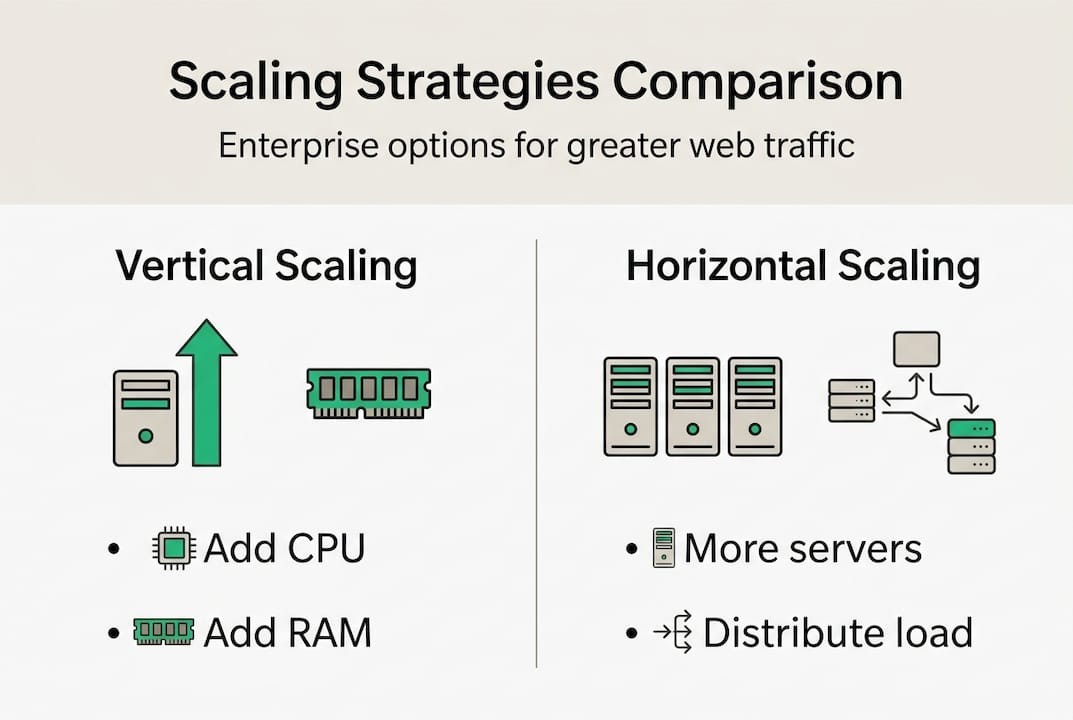
Vertical scaling adds more CPU, memory, or storage to an existing server. It is fast to implement and works well at smaller scale. But it creates a single point of failure and has a hard ceiling. Horizontal scaling adds more server instances and distributes load across them. It is more resilient and has no theoretical ceiling, but it requires stateless application design and more operational discipline.
Here is a direct comparison of the major scaling approaches:
| Approach | Cost profile | Resilience | Ops burden | Best for |
|---|---|---|---|---|
| Vertical scaling | Low short-term | Low | Low | Early-stage or legacy systems |
| Horizontal scaling | Higher long-term | High | Medium | Growth-stage enterprise platforms |
| Serverless | Usage-based | High | Low | Bursty, unpredictable workloads |
| Multi-cloud | High | Very high | High | Mission-critical, regulated environments |
| CDN + caching | Low incremental | Medium | Low | Static and semi-static content |
As cloud architecture comparisons show, vertical scaling is cheaper short-term but creates single-point-of-failure risk, while horizontal scaling is resilient but requires statelessness across services.
Real-world results from well-designed scaling implementations are significant. Wix’s scaled infrastructure demonstrates outcomes like 74% CDN efficiency gains, 60% reductions in load time, and up to 6x latency improvements after architectural changes.
Key pillars to consider for enterprise deployments:
- CDN (Content Delivery Network): Distributes static assets globally, reducing origin server load.
- Database sharding: Splits data across multiple database instances to prevent query bottlenecks.
- Caching layers: Redis or Memcached reduce repeated database calls for frequently accessed data.
- Serverless functions: Handle bursty workloads without pre-provisioning capacity.
- Multi-region deployment: Keeps latency low for geographically distributed audiences.
Pro Tip: Build stateless services from the start. If your application stores session data locally on a single server, horizontal scaling becomes nearly impossible. Stateless design is the prerequisite for everything else.
Hybrid approaches combining multi-region hosting, CDN, and serverless functions are increasingly common in enterprise deployments. Reviewing scalable architecture examples and the high-traffic WordPress guide gives teams concrete models to adapt.
Traffic management: Monitoring, planning, and load balancing
Frameworks provide the structure. Monitoring and traffic management keep that structure functioning under real conditions.
Capacity planning is not guesswork. It is a data-driven process that uses historical traffic patterns, seasonal forecasting, and stress testing to predict infrastructure needs before demand arrives. Key metrics for capacity planning include requests per second (RPS), p95 and p99 latency, error rates, database query times, and CPU and memory utilization.
Here is a five-step workflow for scaling readiness:
- Forecast demand. Use analytics data to model expected traffic for campaigns, launches, and seasonal peaks.
- Baseline current performance. Run load tests under normal conditions to establish your starting point.
- Simulate peak load. Tools like k6 and JMeter generate synthetic traffic to identify bottlenecks before they happen in production.
- Review and adjust. Analyze results, fix identified weaknesses, and retest.
- Conduct live failover drills. Simulate actual failure scenarios to validate that redundancy and recovery mechanisms work.
| Metric | Why it matters | Target threshold |
|---|---|---|
| Requests per second | Measures throughput capacity | Depends on baseline |
| p99 latency | Captures worst-case user experience | Under 2 seconds |
| Error rate | Signals system stress | Below 0.1% |
| CPU utilization | Indicates headroom before saturation | Below 70% sustained |
| DB query time | Reveals database bottlenecks | Under 100ms average |
Load balancer selection also matters. Global, regional, and hybrid load balancers serve different needs. Cloudflare operates at the global edge layer. AWS ALB and NLB handle regional distribution. Azure Front Door provides global Layer 7 routing. Hybrid architectures combining multiple approaches are recommended for enterprises with complex, multi-region footprints.
Pro Tip: Integrate load testing into your CI/CD pipeline. Every code deployment should trigger an automated stress test so regressions in scalability are caught before they reach production. This turns scalability from a one-time project into an ongoing operational standard.
For teams managing high-traffic WordPress environments, handling high traffic and content scalability tips provide platform-specific guidance that complements these general principles.
Handling spikes and edge cases: Protecting against the unexpected
Even the most carefully planned infrastructure gets tested by events that fall outside normal models. Viral campaigns, breaking news, flash sales, and coordinated bot attacks create traffic patterns that stress-test every assumption in your architecture.
The toughest edge cases enterprises face include:
- Viral traffic spikes: A single social post or news mention can drive 10x to 100x normal traffic in minutes.
- Database connection storms: Sudden surges overwhelm connection pools, causing cascading failures across the application layer.
- Cache hot keys: A single heavily requested cache key becomes a bottleneck when thousands of requests hit it simultaneously.
- Retry storms: Failed requests trigger automatic retries, amplifying load at exactly the wrong moment.
- Serverless cold starts: Functions that have not been invoked recently take longer to respond, adding latency during the first wave of a spike.
As scalable architecture research shows, countermeasures for these edge cases include rate limiting on APIs, warm pools to pre-initialize serverless functions, circuit breakers to isolate failing dependencies, load shedding to protect VIP traffic flows, and exponential backoff with jitter to prevent retry storms.
“Resilience is not about preventing failure. It is about containing failure so it does not become a catastrophe.”
Leading enterprises simulate failure regularly. News organizations run drills before major election nights. E-commerce platforms stress-test before Black Friday. SaaS companies use chaos engineering to deliberately introduce failures in controlled environments and measure recovery time.
For marketing teams, enterprise SEO workflows that depend on consistent uptime benefit directly from these resilience practices. For IT teams, enterprise threat modeling adds a security dimension to the same edge-case thinking.
Why most scalability projects miss the mark—and how to get it right
Most enterprise scalability failures are not technology failures. They are people and process failures.
The pattern is consistent: a team invests in new infrastructure, declares the scalability problem solved, and then stops paying attention. Monitoring gaps widen. Alerting thresholds go un-tuned. Teams rotate, and institutional knowledge about the architecture walks out the door. The next traffic event exposes everything.
Underinvestment in monitoring and alerting is the most common root cause we see. The second is lack of cross-team ownership. When IT owns the infrastructure and marketing owns the traffic, nobody owns the intersection. That gap is where outages live.
Marketing and IT need a shared language and shared goals. Documented Service Level Objectives (SLOs) give both teams a common definition of success. Regular joint drills build the muscle memory to respond when things go wrong. Shared post-incident reviews turn failures into learning instead of blame.
Scalability is also not a one-time fix. Traffic patterns change. Campaigns evolve. Content volume grows. The architecture that handles today’s load may not handle next year’s. Following enterprise website best practices means treating scalability as an ongoing operational discipline, not a project with a completion date.
Advance your enterprise website’s scalability with proven expertise
Building a scalable enterprise website requires more than choosing the right cloud provider. It requires architecture decisions, operational discipline, and platform expertise working together.
40Q builds enterprise-grade WordPress platforms designed specifically for high-traffic, content-heavy organizations. Our FAS Block System™ gives marketing teams publishing autonomy while IT retains full control over performance, security, and governance. We also provide dedicated guidance for teams preparing to handle high-traffic events and AI-assisted content workflows through our WordPress AI Suite. Whether you are planning for a major campaign or rebuilding your platform for long-term scale, we can help your team move faster without compromising reliability.
Frequently asked questions
How do I know if my website is truly scalable?
Check if your site maintains performance and availability during both traffic surges and steady growth. Capacity planning metrics like latency, error rates, and sustained throughput under stress testing are the clearest indicators of real scalability limits.
What’s the difference between vertical and horizontal scaling?
Vertical scaling adds resources to a single server, while horizontal scaling expands capacity by adding more machines or instances. As cloud architecture comparisons confirm, vertical is simpler but risky, while horizontal enables true scale with additional operational effort.
How can enterprises handle viral traffic spikes safely?
Use rate limiting, caching, redundant load balancers, and simulate surges via stress testing to prepare for viral events without downtime. Edge case countermeasures like circuit breakers and warm pools are essential for absorbing sudden, unpredictable demand.
What is the role of load balancing in scalability?
Load balancing distributes traffic evenly across servers or locations, preventing overload and enabling smooth performance at scale. Different load balancer types, including global, regional, and hybrid configurations, each serve distinct enterprise needs.
Recommended

May 7, 2025
WordPress
How Enterprise Content Teams Are Adopting AI Tools in 2025

Feb 20, 2026
WordPress
Web Maintainability: Empowering Enterprise Teams for Growth

Feb 12, 2026
WordPress