
WordPress
Enterprise content workflows: streamline and scale with confidence

José Debuchy
April 13, 2026 | 3 min to read
TL;DR:
- Modern enterprise content workflows prioritize composability, automation, and governance integration.
- Simplifying workflows and automating repetitive steps significantly increases content delivery speed and control.
- Addressing edge cases with event-driven functions helps maintain compliance and avoid delays.
Most enterprises invest heavily in content tools, yet still face publishing delays, compliance bottlenecks, and frustrated marketing teams. The problem is rarely a lack of technology. It’s a lack of workflow clarity. When approval chains are undefined, automation is absent, and governance is an afterthought, even the best CMS becomes a liability. This guide breaks down how modern enterprise content workflows are structured, where they break down, and how forward-thinking organizations are using automation, AI, and composable architectures to publish faster without sacrificing control or compliance.
Key Takeaways
| Point | Details |
|---|---|
| Composable workflows matter | Enterprises get more agility and governance by migrating to composable, event-driven workflows. |
| AI and automation unlock speed | Automating high-variance and repetitive tasks accelerates approvals and reduces compliance cycle time. |
| Simplification reduces risk | Cutting unnecessary workflow states and using least-privilege policies lead to fewer errors and faster releases. |
| Edge cases need orchestration | Event-driven functions and robust previews are essential to handle multi-brand, compliance, and rollback scenarios safely. |
The evolution of enterprise content workflows
Enterprise content operations have changed dramatically over the past decade. Early systems were rigid. A single monolithic CMS handled everything, from authoring to publishing, with little room for customization or scale. Approval processes were manual. Release management was informal. Multi-brand or multi-region publishing was an afterthought.
That model broke under pressure. As organizations scaled, content volumes multiplied, teams grew distributed, and digital channels diversified. The old tools simply could not keep up.
The response was composability. Open, headless CMS architectures emerged as a direct answer to this complexity. Instead of one system doing everything, composable platforms connect best-in-class tools through APIs. Content is decoupled from presentation. Workflows are modular. Automation handles the repetitive steps.
As Forrester Wave research confirms, leading content platforms in 2026 are differentiated by AI-driven orchestration, cross-app workflow integration, and governance tooling. These are no longer optional features. They are table stakes for high-volume content operations.
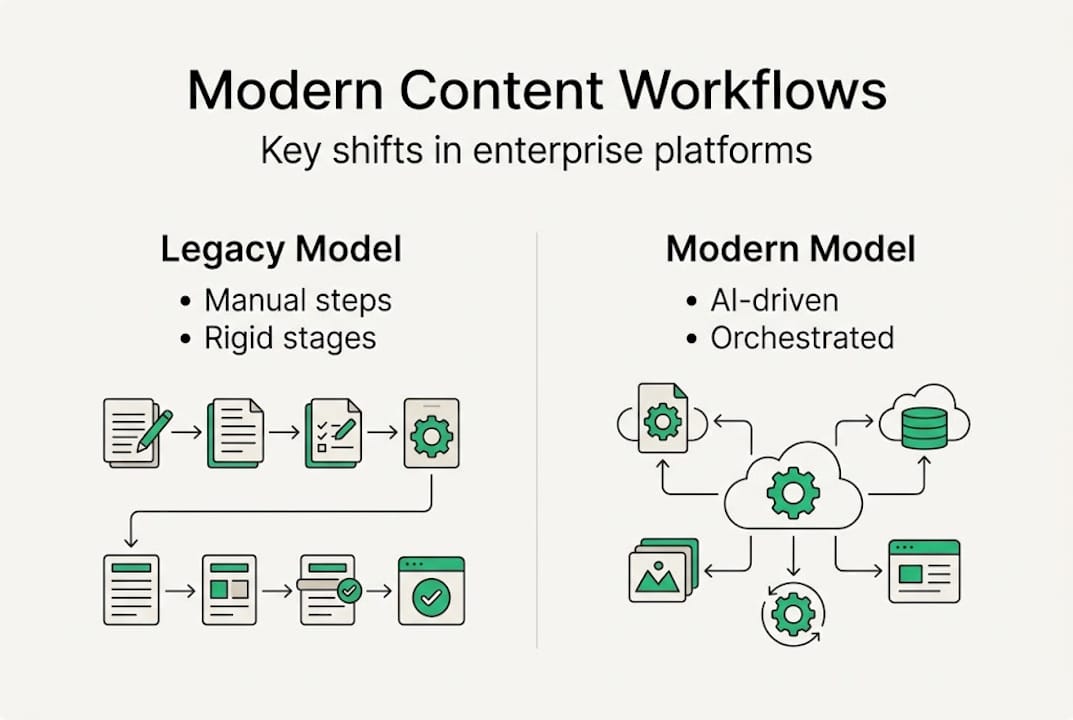
Governance has also shifted from a compliance checkbox to a core architectural concern. Least-privilege access, audit trails, and role-based controls are now built into the workflow layer itself. Every content action is traceable. Every approval is logged. This matters not just for compliance but for operational resilience.
Modern enterprise CMS workflows emphasize composable, headless architectures with real-time collaboration and automation. That shift reflects a broader truth: the future of enterprise CMS is not about adding more features. It’s about connecting the right capabilities in the right sequence.
| Capability | Legacy approach | Modern approach |
|---|---|---|
| Approvals | Manual, single-approver | Multi-step, event-driven |
| Release management | Ad hoc, informal | Scheduled, automated |
| Multi-brand support | Custom builds per brand | Centralized with brand controls |
| Audit trails | Minimal or absent | Full, real-time logging |
| Automation | None or scripted | Native, trigger-based |
The shift is structural, not cosmetic. Organizations that treat workflow modernization as a feature upgrade miss the point entirely.
Core components of efficient enterprise content workflows
Efficiency in enterprise content workflows does not happen by accident. It is the result of deliberate design across five core pillars: collaboration tools, tiered approvals, automation triggers, real-time visibility, and secure access controls.

Collaboration tools must support simultaneous editing, inline commenting, and version history. Without these, teams default to email chains and shared documents, which introduce errors and delays. Tiered approvals allow content to move through legal, brand, regional, and executive sign-off in a defined sequence. No step is skipped. No approver is bypassed.
Automation triggers remove the manual handoffs that slow everything down. When a content item reaches a specific state, the system notifies the next approver, updates the workflow status, and logs the action automatically. Real-time visibility gives both marketing and IT a live view of where every piece of content sits in the pipeline.
Enterprise CMS workflows embrace real-time collaboration, event-driven automation, and scalable approvals across brands and regions. AI automation reduces high-variance task time and boosts collaboration, making it possible to scale content operations without proportionally scaling headcount.
The enterprise CMS security checklist for IT leaders reinforces that secure access controls are not separate from workflow design. They are embedded in it. Role-based permissions determine who can create, edit, approve, and publish. Nothing more, nothing less.
Must-have features for scalable enterprise workflows:
- Event-driven automation for state transitions and notifications
- Multi-step, configurable approval chains
- Cross-entry and cross-brand release management
- Real-time audit logging and access controls
- AI-assisted content review and routing
- Integration with legal, compliance, and localization tools
- Preview environments tied to specific workflow states
For teams building or rebuilding their workflow, the agile content creation steps framework offers a practical starting point.
| Component | Legacy | Modern |
|---|---|---|
| State changes | Manual, email-driven | Automated, trigger-based |
| Approvals | Single approver | Multi-tier, role-based |
| Releases | Per-item, ad hoc | Cross-entry, scheduled |
| Notifications | Absent or manual | Smart, real-time |
Pro Tip: Keep custom workflow states to a minimum. Every additional state adds training overhead and increases the chance of human error. Start with five or fewer states and expand only when operationally necessary.
Addressing enterprise workflow edge cases and challenges
Even well-designed workflows encounter edge cases. At enterprise scale, these are not exceptions. They are predictable events that must be planned for in advance.
Stale content previews, for example, occur when a page is approved based on an outdated version. Overwrites happen when two editors work on the same entry without a locking mechanism. Compliance bottlenecks emerge when legal sign-off is required but not integrated into the workflow path.
Edge cases like multi-brand approvals and compliance checks require event-driven functions and dual approvals to resolve reliably. Without these, even a single missed step can delay a campaign launch or trigger a compliance violation.
The five most common workflow edge cases in enterprise environments:
- Dual-approver chains: Content requiring sign-off from two independent stakeholders before advancing.
- Compliance sign-off: Legal or regulatory review that must occur before publication, often with documentation requirements.
- Regional legal variation: Content that requires different approval paths depending on the target market or jurisdiction.
- Release freezes: Scheduled blackout periods during which no content can be published, often tied to financial reporting or product launches.
- Rollback scenarios: The need to revert published content quickly without manual intervention or developer support.
Event-driven workflow orchestration handles these scenarios by encoding the logic directly into the system. If a release freeze is active, the system blocks publication automatically. If a rollback is triggered, the previous approved version is restored without a ticket being raised.
Robust preview environments, full audit trails, and separation of duties are not optional at this scale. They are the operational foundation. WordPress governance best practices for enterprise teams provide a useful reference for structuring these controls within a WordPress-based stack.
For further context on how leading platforms handle these scenarios, the enterprise platform leader comparison from Forrester outlines how top vendors approach workflow governance.
Pro Tip: Use audit trails and test releases in a staging environment before every major campaign launch. Catching a broken approval path in staging costs minutes. Catching it in production costs days.
Best practices: Transforming workflow design for productivity and control
Workflow transformation is not about adding layers. It is about removing friction. Most enterprises that struggle with content velocity are not under-tooled. They are over-complicated.
The organizations that lead on content productivity share a common pattern: they map their processes before they automate them, restrict access to what each role actually needs, and standardize approval paths across teams rather than allowing each business unit to build its own.
Workflow redesign unlocks productivity and AI reduces legal workflow time by up to 4x. That is not a marginal gain. It is a structural shift in how fast content moves from brief to published. Top CMS providers focus on AI-driven orchestration and workflow governance for high-volume performance, and the gap between leaders and laggards is widening.
Key steps for workflow transformation:
- Map every current process before changing anything. Identify where delays actually occur.
- Automate high-variance tasks first. These are the steps where human error is most likely.
- Apply least-privilege access. Every role should have exactly the permissions it needs, nothing more.
- Standardize approval paths. Avoid one-off workflows for individual teams or campaigns.
- Use packaged apps and integrations rather than custom code wherever possible.
- Measure cycle time from draft to publish. Use it as your primary workflow health metric.
Effective content governance strategies tie these steps together into a repeatable operating model. Without governance, even a well-designed workflow degrades over time as exceptions accumulate.
Stat callout: Enterprises that redesign workflows around AI-assisted automation report up to 4x faster legal content review cycles, according to McKinsey research cited by ContentGrip.
Scalable CMS solutions built on this foundation give marketing teams the speed they need while giving IT the control they require. That balance is achievable. But it requires deliberate design, not incremental patching.
Our take: What most leaders miss about content workflow modernization
Most failed workflow projects share one trait: they add complexity instead of removing it. A new approval state here, a custom permission tier there, a bespoke integration for one team’s edge case. Within months, the system is harder to use than what it replaced.
The uncomfortable truth is that cross-team transparency delivers more value than custom features. When marketing, legal, IT, and regional teams can all see the same workflow state in real time, most coordination problems disappear without any additional tooling.
Modernization is not about more permissions or more workflow stages. It is about orchestration and reliable automation. The teams that get this right strip their workflows down to the minimum viable structure, automate the predictable steps, and govern through clear rules rather than manual oversight.
As we see in SEO workflow insights and broader content operations, the highest-performing teams treat their workflow as a product. They iterate on it, measure it, and simplify it continuously. Controlled chaos, where speed and governance coexist, is the real standard for high-growth digital content teams in 2026.
Ready to modernize your enterprise content workflows?
If your content operations are slower than your business demands, the answer is not more tools. It is better architecture.
At 40Q agency, we build enterprise-grade WordPress platforms designed for exactly this challenge. Our WordPress AI Suite brings AI-assisted content workflows, smart approvals, and automation directly into your publishing environment. Our Enterprise-Grade WordPress solutions give marketing teams full publishing autonomy while IT retains complete control over security, performance, and governance. Whether you are starting from scratch or modernizing an existing stack, we can help you move faster with less risk. Book a discovery call to see what a purpose-built workflow looks like in practice.
Frequently asked questions
Recommended

Oct 22, 2024
WordPress
What’s on Your MarTech Stack?

Feb 3, 2026
WordPress
Enterprise-Grade WordPress: Empowering Marketing Teams
Apr 9, 2024
WordPress