
WordPress
Marketing Autonomy Platforms vs. Alternatives: A Complete Comparison

Martin Szigeti
June 17, 2026 | 3 min to read
Overview: Choosing the Right Platform for Marketing Independence
The core question: Should your enterprise marketing team use a marketing autonomy platform, a no-code website builder, a traditional CMS with developer dependency, or an all-in-one marketing platform?
The short answer: It depends on your team size, technical resources, compliance requirements, and scalability needs.
This guide compares marketing autonomy platforms (like enterprise WordPress with custom governance systems) against three primary alternatives:
- No-code tools (Webflow, Wix, Squarespace)
- Traditional CMS with developer dependency (WordPress without autonomy systems, Drupal, custom builds)
- All-in-one marketing platforms (HubSpot, Marketo with CMS modules)
For each comparison, we’ll cover: speed, governance, integrations, scalability, cost, and when to choose each option.
1. Marketing Autonomy Platforms vs. No-Code Tools
What Are No-Code Tools?
No-code website builders (Webflow, Wix, Squarespace, Framer) let non-technical users create websites through visual drag-and-drop interfaces. They’re designed for speed and ease of use, with pre-built templates and components.
Head-to-Head Comparison
| No-Code Tools (Webflow, Wix, Squarespace) | Marketing Platforms (Enterprise WordPress + Governance) | |
|---|---|---|
|
Publishing speed
|
Fast (minutes to hours)
|
Fast (minutes to hours)
|
|
Governance & approvals
|
Limited or nonexistent
|
Built-in workflows, roles, approvals
|
|
Integrations
|
Pre-built only (limited options)
|
Deep, custom integrations with CRM, MAP, analytics, AI
|
|
Scalability
|
Struggles at 1,000+ pages
|
Scales to 10,000+ pages without performance degradation
|
|
Compliance
|
Not enterprise-grade
|
Audit trails, role-based permissions, regional compliance
|
|
Customization
|
Template-based, limited
|
Highly customizable while maintaining governance
|
|
Performance at scale
|
Degrades with complexity
|
Performance-optimized from day one
|
|
Vendor lock-in
|
High (proprietary platforms)
|
Low (open-source core, portable)
|
|
Cost
|
Monthly SaaS ($29-$299/month)
|
One-time build + hosting ($5-50/month)
|
|
Best for
|
Small teams (< 10 people), simple sites (< 100 pages), no compliance needs
|
Enterprise teams, complex sites, regulated industries, deep integrations
|
| No-Code Tools (Webflow, Wix, Squarespace) | Marketing Platforms (Enterprise WordPress + Governance) | |
|---|---|---|
|
Publishing speed
|
Fast (minutes to hours)
|
Fast (minutes to hours)
|
|
Governance & approvals
|
Limited or nonexistent
|
Built-in workflows, roles, approvals
|
|
Integrations
|
Pre-built only (limited options)
|
Deep, custom integrations with CRM, MAP, analytics, AI
|
|
Scalability
|
Struggles at 1,000+ pages
|
Scales to 10,000+ pages without performance degradation
|
|
Compliance
|
Not enterprise-grade
|
Audit trails, role-based permissions, regional compliance
|
|
Customization
|
Template-based, limited
|
Highly customizable while maintaining governance
|
|
Performance at scale
|
Degrades with complexity
|
Performance-optimized from day one
|
|
Vendor lock-in
|
High (proprietary platforms)
|
Low (open-source core, portable)
|
|
Cost
|
Monthly SaaS ($29-$299/month)
|
One-time build + hosting ($5-50/month)
|
|
Best for
|
Small teams (< 10 people), simple sites (< 100 pages), no compliance needs
|
Enterprise teams, complex sites, regulated industries, deep integrations
|
The appeal is obvious, these platforms eliminate the developer dependency. You don’t need to hire an engineer or wait for one to be available. A single team member can ship a complete website in days instead of weeks. Pre-built templates and component libraries handle design consistency so you don’t start from a blank canvas. Common integrations (payment processors, email tools, analytics) are baked in.
The tradeoff is equally important. No-code builders prioritize speed and ease, which means they sacrifice flexibility. Your website is constrained by what the platform permits. Need a custom integration? It might not exist. Need a specific feature? You’re either limited by what the builder offers, or you hit the ceiling where you need actual code (and often at that point, you’re already locked in). Customization beyond the template library typically requires learning the platform’s proprietary scripting (which isn’t quite “no-code” anymore).
Which Platform Fits Your Team?
When to Choose No-Code Tools
Choose Webflow, Wix, or Squarespace if:
- Your team is fewer than 5 people
- Your site will have fewer than 20 pages
- You don’t need complex integrations beyond pre-built connectors
- Compliance and audit trails aren’t requirements
- You prioritize speed of initial setup over long-term scalability
Real-world example:
A 5-person startup launching their first marketing site with 20 pages and basic HubSpot forms → Webflow works great.
When to Choose Marketing Autonomy Platforms
Choose enterprise WordPress with governance systems if:
- Your team is 10+ people across marketing, sales, and compliance
- Your site will scale to 100+ pages (or already has)
- You need deep integrations with Salesforce, Marketo, analytics platforms, and AI tools
- Compliance, security, and audit trails are non-negotiable (finance, healthcare, legal)
- You want to avoid vendor lock-in and own your infrastructure
Real-world example:
A fintech company with 50-person marketing team, 1,000+ pages, Salesforce integration, and regulatory compliance requirements → Marketing autonomy platform (40Q’s approach) is the right fit.
Migration Path: Moving from No-Code to Marketing Autonomy
Many companies start on Webflow or Wix, then hit a wall:
Common breaking points:
- Page count > 100 — Performance degrades, site becomes slow
- Form complexity — Need conditional logic, multi-step forms, Salesforce field mapping
- Compliance requirements — Audit trails, approval workflows, role-based access needed
- Integration depth — Pre-built connectors can’t handle custom data flows
Migration timeline: 8-12 weeks for a typical enterprise migration from Webflow/Wix to WordPress with governance systems.
What gets preserved:
- All content (pages, blog posts, images)
- SEO rankings (proper 301 redirects)
- Analytics history (migration doesn’t reset GA4)
What improves:
- Publishing speed (faster even than Webflow at scale)
- Performance (custom optimization vs. shared infrastructure)
- Control (own your code, data, and infrastructure)
2. Marketing Autonomy Platforms vs. Traditional CMS (with Developer Dependency)
What Is a Traditional CMS with Developer Dependency?
This is WordPress, Drupal, or a custom-built CMS where every content change, landing page, or campaign requires developer intervention. Marketing can’t publish independently—they open tickets and wait.
| Traditional CMS (Dev Dependency) | Marketing Platforms (Enterprise WordPress + Governance) | |
|---|---|---|
|
Publishing speed
|
1-2 weeks (requires dev ticket)
|
1-2 hours (self-service)
|
|
Flexibility
|
Unlimited (dev can build anything)
|
High (within governed system)
|
|
Team required
|
Developers + marketers
|
Marketers only (dev for platform maintenance)
|
|
Developer focus
|
Distracted by marketing requests
|
Focused on product and infrastructure
|
|
Cost
|
High ongoing dev costs (tickets, sprints, maintenance)
|
Lower (one-time setup, minimal ongoing dev)
|
|
Testing velocity
|
1-2 A/B tests per month (each requires dev)
|
10-15 tests per month (self-service)
|
|
Campaign launches per quarter
|
3-5 (bottlenecked by dev capacity)
|
15-20 (bottlenecked only by marketing capacity)
|
|
Time-to-market for campaigns
|
2-4 weeks (idea → dev ticket → review → launch)
|
1-2 days (idea → build → launch)
|
|
Best for
|
Teams with dedicated, available dev resources
|
Teams wanting marketing independence
|
| Traditional CMS (Dev Dependency) | Marketing Platforms (Enterprise WordPress + Governance) | |
|---|---|---|
|
Publishing speed
|
1-2 weeks (requires dev ticket)
|
1-2 hours (self-service)
|
|
Flexibility
|
Unlimited (dev can build anything)
|
High (within governed system)
|
|
Team required
|
Developers + marketers
|
Marketers only (dev for platform maintenance)
|
|
Developer focus
|
Distracted by marketing requests
|
Focused on product and infrastructure
|
|
Cost
|
High ongoing dev costs (tickets, sprints, maintenance)
|
Lower (one-time setup, minimal ongoing dev)
|
|
Testing velocity
|
1-2 A/B tests per month (each requires dev)
|
10-15 tests per month (self-service)
|
|
Campaign launches per quarter
|
3-5 (bottlenecked by dev capacity)
|
15-20 (bottlenecked only by marketing capacity)
|
|
Time-to-market for campaigns
|
2-4 weeks (idea → dev ticket → review → launch)
|
1-2 days (idea → build → launch)
|
|
Best for
|
Teams with dedicated, available dev resources
|
Teams wanting marketing independence
|
Which Platform Fits Your Team?
When to Stick with Traditional CMS
Stick with developer-dependent CMS if:
- You have a dedicated dev team with excess capacity (rare at enterprise scale)
- Your campaigns are infrequent (< 5 per year)
- You prefer custom-built solutions for everything
- Your marketing team has no desire to self-serve
Real-world example:
A B2B enterprise software company with 10 developers on the web team, only 3 marketing campaigns per year, and marketing prefers to hand off all web work → Traditional CMS works.
When to Implement Marketing Autonomy
Implement marketing autonomy if:
- Your marketing team is frustrated by slow publishing timelines
- You launch 10+ campaigns per year
- Developers are stretched thin between product work and marketing requests
- You want to run more A/B tests but dev capacity is the bottleneck
3. Marketing Autonomy Platforms vs. All-in-One Marketing Platforms
What Are All-in-One Marketing Platforms?
All-in-one platforms (HubSpot, Marketo with web modules, ActiveCampaign) bundle CMS, marketing automation, CRM, and analytics into a single product. They promise simplicity through integration, but often sacrifice flexibility.
| All-in-One Platforms (HubSpot, Marketo) | Marketing Platforms (Enterprise WordPress + Governance) | |
|---|---|---|
|
CMS capabilities
|
Basic, limited customization
|
Advanced, highly customizable
|
|
Marketing automation
|
Best-in-class (core product)
|
Integrated via API (use best-of-breed)
|
|
Customization
|
Limited by platform constraints
|
Highly customizable architecture
|
|
Vendor lock-in
|
High (proprietary data models)
|
Low (open standards, portable)
|
|
Cost
|
Monthly SaaS fees scale with contracts ($800-8,000+/month)
|
One-time build + hosting ($5-50/month ongoing)
|
|
Performance
|
Shared infrastructure, variable performance
|
Dedicated, optimized infrastructure
|
|
Integrations
|
Pre-built within ecosystem
|
Custom integrations with any platform
|
|
Content ownership
|
Platform owns your data
|
You own your content and code
|
|
Best for
|
Small teams (< 20 people) prioritizing simplicity over flexibility
|
Enterprises wanting best-of-breed integrations without lock-in
|
| All-in-One Platforms (HubSpot, Marketo) | Marketing Platforms (Enterprise WordPress + Governance) | |
|---|---|---|
|
CMS capabilities
|
Basic, limited customization
|
Advanced, highly customizable
|
|
Marketing automation
|
Best-in-class (core product)
|
Integrated via API (use best-of-breed)
|
|
Customization
|
Limited by platform constraints
|
Highly customizable architecture
|
|
Vendor lock-in
|
High (proprietary data models)
|
Low (open standards, portable)
|
|
Cost
|
Monthly SaaS fees scale with contracts ($800-8,000+/month)
|
One-time build + hosting ($5-50/month ongoing)
|
|
Performance
|
Shared infrastructure, variable performance
|
Dedicated, optimized infrastructure
|
|
Integrations
|
Pre-built within ecosystem
|
Custom integrations with any platform
|
|
Content ownership
|
Platform owns your data
|
You own your content and code
|
|
Best for
|
Small teams (< 20 people) prioritizing simplicity over flexibility
|
Enterprises wanting best-of-breed integrations without lock-in
|
The All-in-One Trade-Off
What you gain with all-in-one:
- Simplicity: Everything in one login
- Pre-built workflows: Email → form → CRM flows work out of the box
- Single vendor relationship: One support team for everything
What you sacrifice with all-in-one:
- CMS power: HubSpot’s CMS is far less capable than WordPress
- Flexibility: Can’t use best-of-breed tools (stuck with HubSpot email even if Marketo is better for you)
- Cost control: Fees scale with contact count (grows exponentially)
- Data portability: Migrating off HubSpot is painful (proprietary data models)
Which Platform Fits Your Team?
When to Use All-in-One Platforms
Choose HubSpot or Marketo if:
- Your team is fewer than 20 people
- You prioritize simplicity over flexibility
- You don’t have technical resources to manage integrations
- Your website needs are basic (< 50 pages, simple forms)
When to Implement Marketing Autonomy
Implement marketing autonomy if:
- Your website is a strategic asset (not an afterthought)
- You want best-of-breed tools (e.g., Salesforce CRM + Marketo automation + WordPress CMS)
- Your contact count is growing (all-in-one costs would scale unsustainably)
- You need advanced CMS capabilities (1,000+ pages, complex content types, personalization)
- You want to own your infrastructure and avoid vendor lock-in
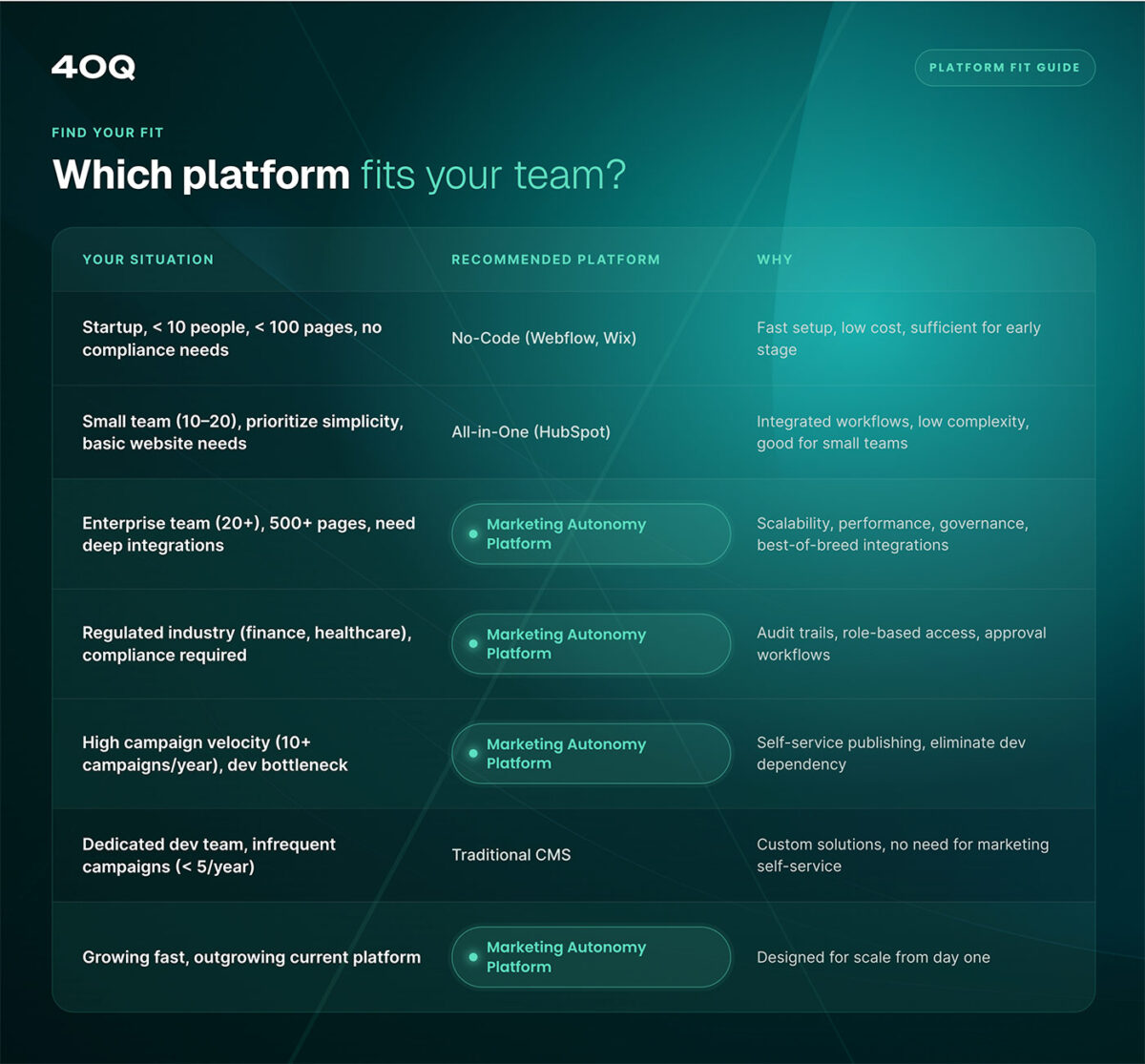
Decision Matrix: Which Platform Is Right for You?
Identify the best platform for your business
Startup, < 10 people, < 100 pages, no compliance needs
No-Code (Webflow, Wix) – Fast setup, low cost, sufficient for early stage
Small team (10-20), prioritize simplicity, basic website needs
All-in-One (HubSpot) – Integrated workflows, low complexity, good for small teams
Enterprise team (20+), 500+ pages, need deep integrations
Marketing Autonomy Platform – Scalability, performance, governance, best-of-breed integrations
Regulated industry (finance, healthcare), compliance required
Marketing Autonomy Platform – Audit trails, role-based access, approval workflows
High campaign velocity (10+ campaigns/year), dev bottleneck
Marketing Autonomy Platform – Self-service publishing, eliminate dev dependency
Dedicated dev team, infrequent campaigns (< 5/year)
Traditional CMS – Custom solutions, no need for marketing self-service
Growing fast, outgrowing current platform
Marketing Autonomy Platform – Designed for scale from day one
Frequently Asked Questions

Mar 28, 2026
WordPress
WordPress governance best practices for enterprise teams

Feb 16, 2026
WordPress
Website Maintainability—Why It Matters for Enterprises
Oct 28, 2025
WordPress